

You are using an out of date browser. It may not display this or other websites correctly.
You should upgrade or use an alternative browser.
You should upgrade or use an alternative browser.
Carding d0c's Carding Setup for 2025
- Thread starter d0ctrine
- Start date
-
- Tags
- antifraud bypass setup best antidetect browser for carding best proxy provider carding burp suite carding setup caido web testing carding carding browser fingerprint carding fingerprint protection carding opsec guide carding setup 2025 carding success rate optimization carding tools 2025 dns leak prevention carding ip reputation check carding iphone carding method linken sphere carding tutorial protonvpn carding guide proxy automation script carding proxy setup for carding residential proxies for carding smartproxy carding guide


PARTYBACKDOOR
Basic
- Joined
- 15.12.25
- Messages
- 19
- Reaction score
- 0
- Points
- 1
HelloView attachment 51543
? d0c's Carding Setup for 2025 ?
A lot of you newcomers keep blowing up my inbox asking the same old shit: 'd0ctrine whats your setup? What proxy provider do you use? What anti-detect do you use?' You know what? Im sick of it. So I said 'Fuck it' and wrote this guide. This is the shit I personally use and why I use it. Hopefully this will fatten your wallets as you navigate the tough times of carding this coming 2025.
Understanding the Setup
If youve been paying any attention to my guides you know Im a huge fucking proponent of the iPhone as a carding device. Ive talked about why its the tits extensively on here:
? The iPhone: A Carder's Ultimate Tool ?
So it should be no surprise that 60% of all my carding is done with an iPhone. But telling you to just buy an iPhone would be a massive letdown right? So for the remaining 40% where I use my laptop this guide will break down my setup. Most of the tools and services here are cross-platform meaning you can use them on any OS but to get the best results and highest success rate I recommend sticking with Apple devices. They give you low entropy since most devices look the same so you get a large margin of error when carding.
Proxy Provider
I switch up proxy providers like a paranoid dealer changes burner phones. There are plenty of reasons to do this but for the longest damn time Ive been riding with SmartProxy.
LINK TO SMARTPROXY
Why? Because it hits four of my must-have criteria:
- Large Pool of Proxies: The bigger the pool the better. This pool is shared among all users so a larger pool means less chance of running into some other jackass using the same IP raising red flags.
- Fast and Reliable: Ive had other proxy providers shit the bed mid-carding session forcing me to switch IPs and basically waving a giant red flag at the transaction. SmartProxy has been solid keeping me in the game without those fuck-ups.
- ZIP Targeting: Lets be real ZIP codes are the bread and butter of any successful carding operation. The fact that SmartProxy lets you laser-focus on specific ZIPs? Thats a fucking game-changer.
- High Percentage of Unique IPs: Its not just about having the biggest pool. PIA for example has a huge pool but you often end up with the same damn IP multiple times. SmartProxy has a solid percentage of unique IPs which is what you need to stay under the radar.
- Blocks a Shitload of Financial Sites: This is pure fucking gold. If you read my guide on ? Strategic Carding: Getting the Cleanest Possible IPs ? youd know that to get the cleanest proxies you need providers that block financial and banking sites. Then you work around that block. SmartProxy is a fucking champ at this blocking everything from Shopify to Stripe to banking sites.
Unique IPs
View attachment 51545
Alright lets cut through the 'unique IP' marketing crap. Proxyway did a nice experiment to expose the truth about residential proxy pools. They didnt just take these providers inflated claims at face value. They put them to the test hammering them with hundreds of thousands of requests and cross-referencing the IPs with MaxMind and IP2Location.
They wanted to find out how many unique IPs each provider actually delivered how many were on different C-level subnets (important to avoid getting your ass blocked) and whether they were legit residential addresses.
SMARTPROXY
View attachment 51546
Smartproxy came out on top boasting 57% unique IPs with 37% on unique C-class subnetworks. They claim 10 million IPs and these numbers suggest theyre not entirely full of shit. Oxylabs was a close second but the rest? Fucking embarrassing. Luminati the supposed king of the hill only managed a pathetic 15% unique IPs. RSocks and PacketStream fared even worse. NetNut had a decent number of unique IPs but almost all were on the same subnet. Most other proxy fuckers just resell from these larger pools, so they are more or less the same shit.
OXYLABS
View attachment 51547
NETNUT
View attachment 51548
The bottom line? Most of these providers are inflating their numbers. Theyre probably counting IPs over weeks or months not whats available at any given moment. Smartproxy seems to be the least deceptive but always grill these providers on how they calculate their pool size before you hand over your hard-earned cash.
Smartproxy Script
Look Im all about efficiency. Aint nobody got time to manually configure proxies every damn time. So to make my life easier I whipped up a little script that I run in my terminal. I just punch in the ZIP code I want and boom I get a fresh IP.
View attachment 51552
Usually Smartproxy uses this format:
Code:user-${username}-session-${session}-sessionduration-60-country-us-zip-${zipcode}:${password}@gate.smartproxy.com:7000
But Im a genius so I made a script that automates this. Heres the code:
Bash Script (Mac/Linux)
View attachment 51551
Code:#!/bin/bash # Your Smartproxy username and password username='YOUR_USERNAME' password='YOUR_PASSWORD' # Check if ZIP code argument is provided if [ $# -ne 1 ]; then echo 'Error: Please provide a ZIP code as argument' echo 'Usage: $0 <zipcode>' exit 1 fi # Store ZIP code from command line argument zipcode=$1 # Generate random 8-digit session number session=$(printf '%08d' $(($RANDOM % 100000000))) # Generate proxy string proxy_str='user-${username}-session-${session}-sessionduration-60-country-us-zip-${zipcode}:${password}@gate.smartproxy.com:7000' # Test the proxy echo '=== Proxy IP Information ===' curl -s --proxy 'https://${proxy_str}' ip-api.com/json | jq . echo echo '=== Proxy Configuration ===' echo '${proxy_str}'
How to Use It (Mac):
- Save this script as `prox.sh` somewhere on your Mac.
- Open Terminal and navigate to where you saved the script.
- Make it executable: `chmod +x prox.sh`
- Run it: `bash prox.sh 90210` (replace 90210 with your desired ZIP).
For the Windows Gang:
You can use PowerShell for a similar script:
*** Hidden text: cannot be quoted. ***
How to Use It (Windows):
- Save this as `prox.ps1`.
- Open PowerShell as an administrator.
- Navigate to the scripts location.
- Run it: `.\prox.ps1 10001` (replace 10001 with your ZIP).
Important: Dont forget to replace `'YOUR_USERNAME'` and `'YOUR_PASSWORD'` with your actual Smartproxy credentials in both scripts. Also make sure you have `curl` installed on your Mac and that PowerShell has the necessary permissions to make web requests.
Antidetects
Ive burned through more antidetect browsers than I care to count but only two have proven their worth: GoLogin and Linken Sphere. Dont worry Ill drop a detailed analysis of every antidetect browser Ive tested soon but for now lets focus on what actually works especially if youre running a Mac setup.
LINK TO LINKEN SPHERE
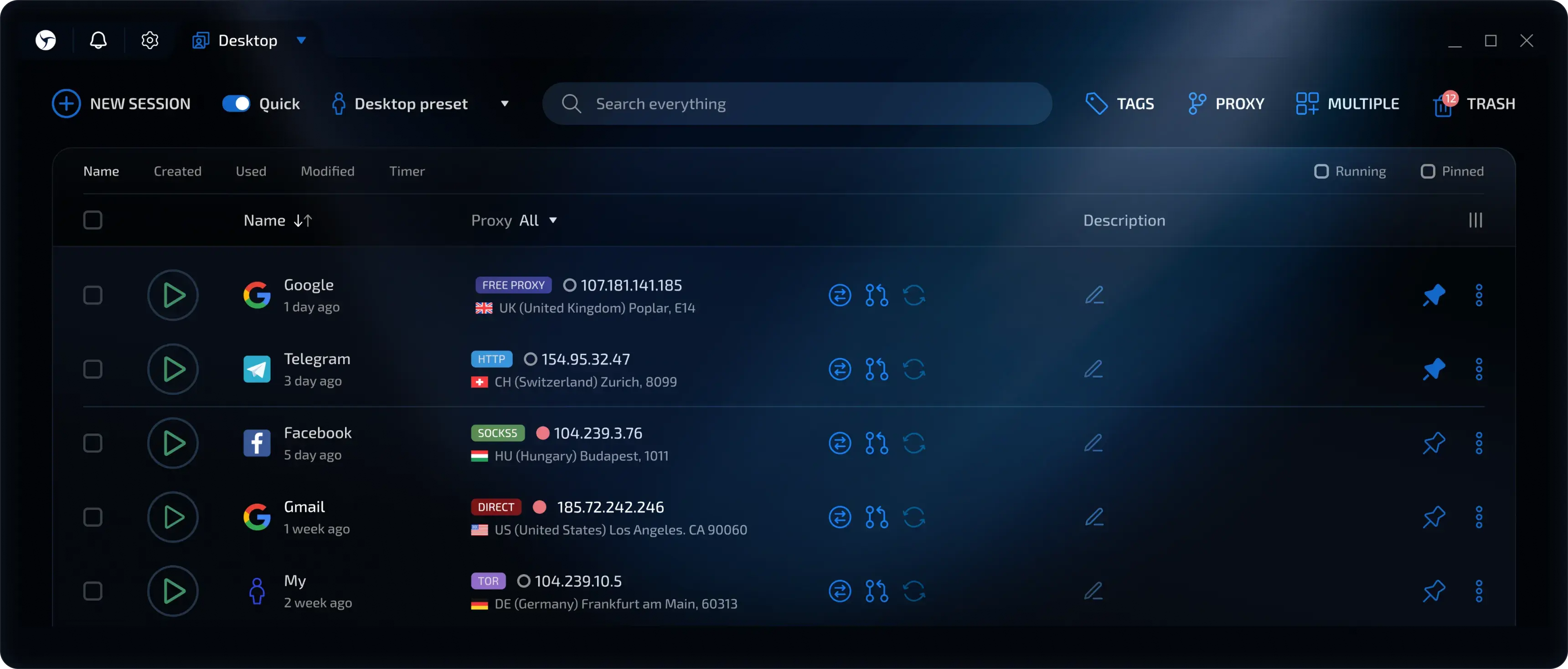
These days I exclusively roll with Linken Sphere. Why? Simple - its the only one that consistently plays nice with custom DNS settings which you absolutely need when dealing with SmartProxy's blocked sites. Their hybrid fingerprinting option keeps my entropy stable and lets me blend in with the normies without raising any red flags.
View attachment 51554
Another killer feature in Linken Sphere is profile warming. Before hitting your target sites especially with logs you can build trust by automating normal browsing patterns - product searches wishlist adds review reading. Mix up the sites you visit and let profiles age for a few days. Fresh profiles scream fraud but ones with established browsing history blend right in with legitimate traffic.
View attachment 51553
The results speak for themselves - my success rate has been solid and Im betting this setup will only get more effective as we push through 2025. When youre dealing with sophisticated antifraud systems having a reliable antidetect isnt just nice to have - its fucking essential.
? Other Tools
Of course my carding setup wouldnt be complete without these bad boys.
Site Analysis:
Fingerprint Checks:
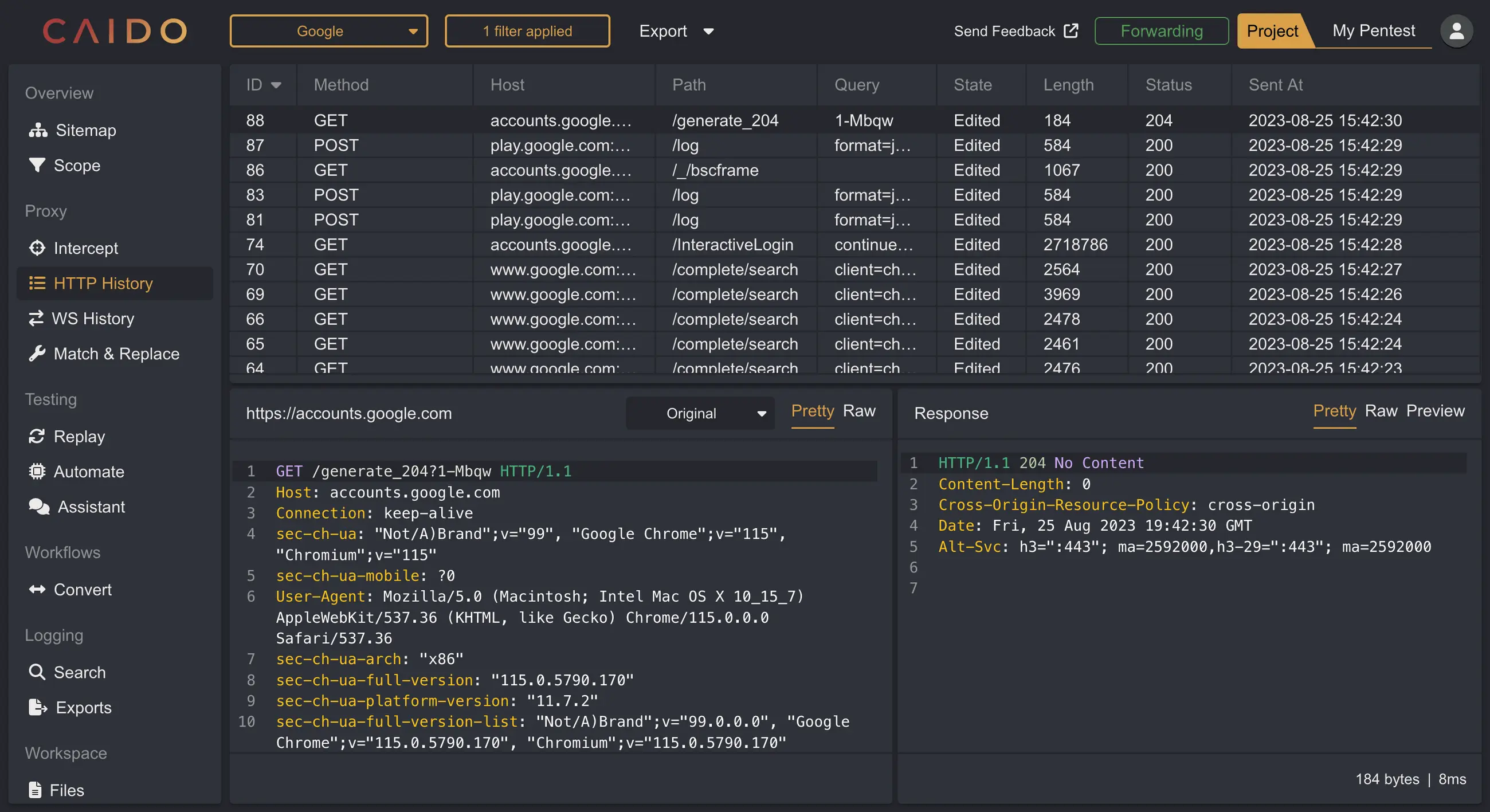
- Caido: Your best friend for picking apart websites. When you need to understand how a site works and how its security operates.
- Burp Suite: The heavyweight champion of web testing. This beast does everything - intercepting and reconaissance you name it.
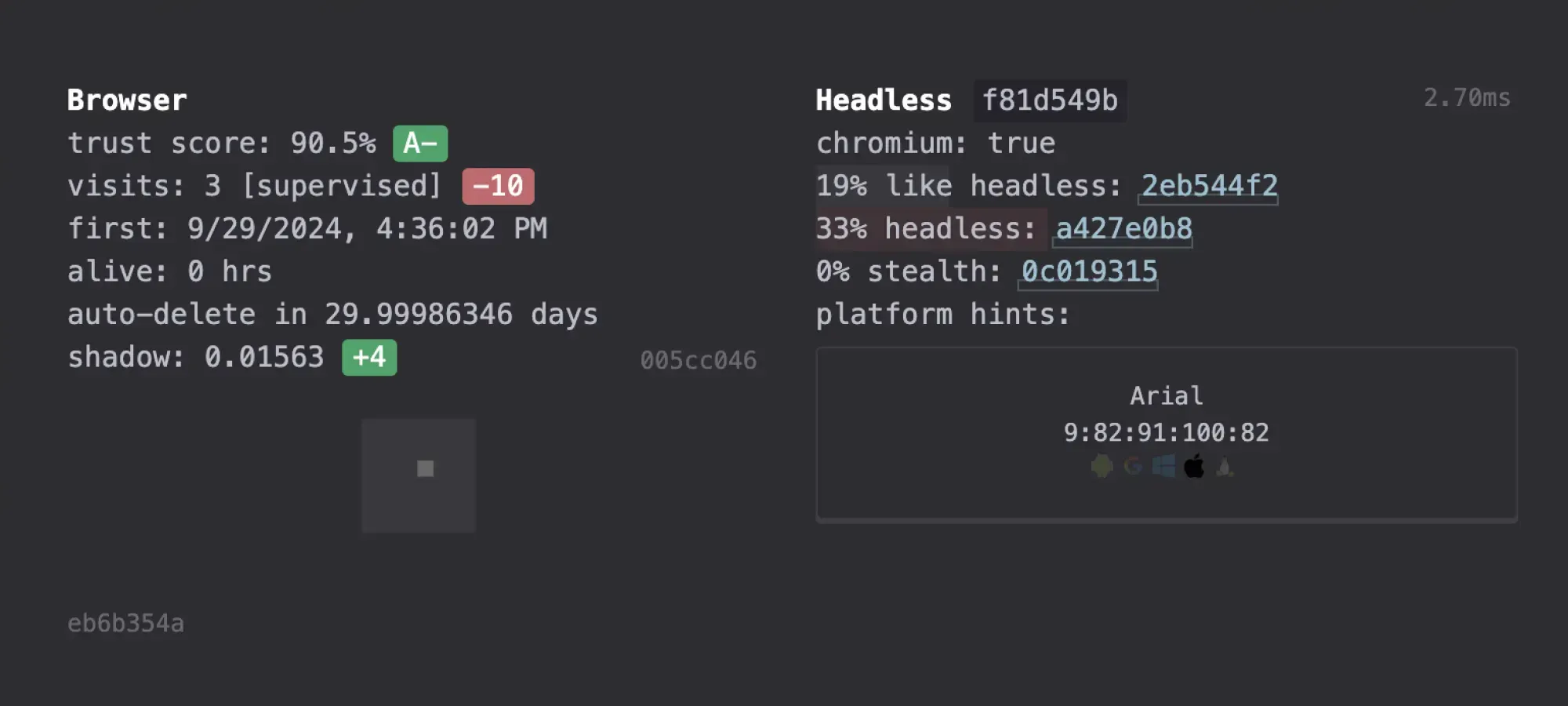
- demo.fingerprint.com: Simple but effective. Shows you exactly what sites see when you visit them.
- creepjs: Gets into the nitty-gritty of your browser fingerprint. Youll be shocked at how much data youre giving away.
- fv.pro: Solid fingerprint checker that breaks down your digital signature piece by piece.
- browserleaks: The full package for seeing what info your browser spills. Trust me its more than you think.
IP Checks:
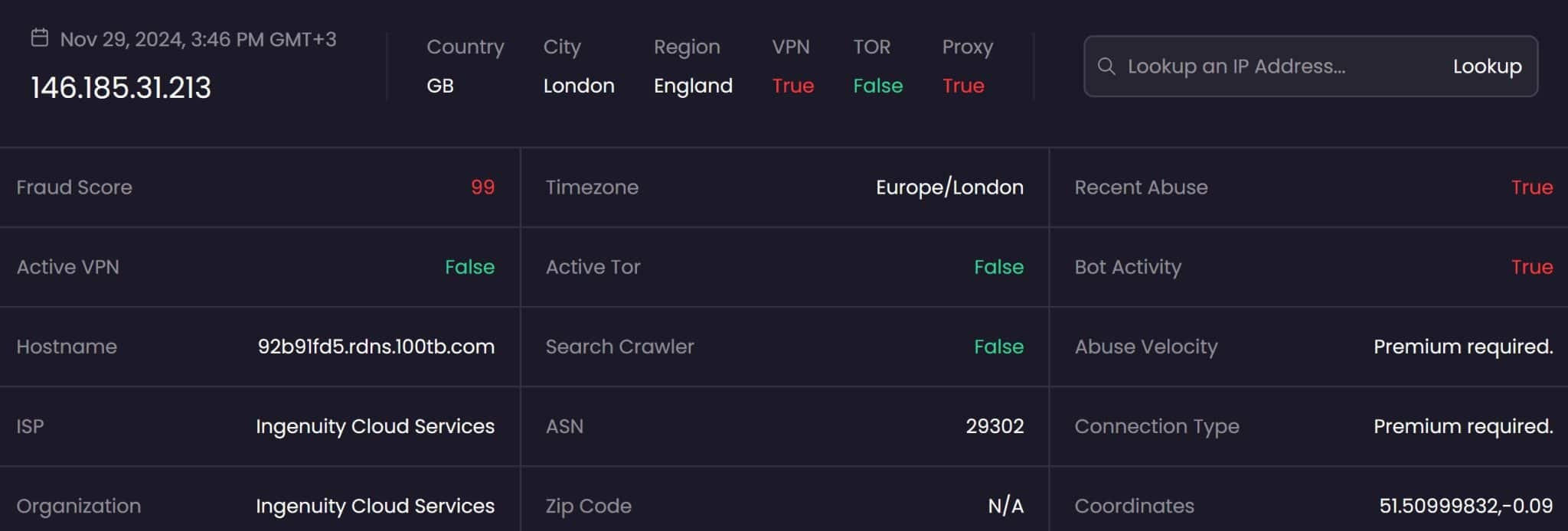
- IPQS (IPQualityScore): Your first line of defense. If your IP is burned IPQS will tell you before you waste your time trying cards.
- Scamalytics: Decent backup for IP checking. Not quite IPQS level but still worth having in your toolkit.
Pro tip: Hook your IPQS API key up to Linken Sphere. Itll watch your IP reputation automatically - saves you a ton of headache and manual checks.
VPN
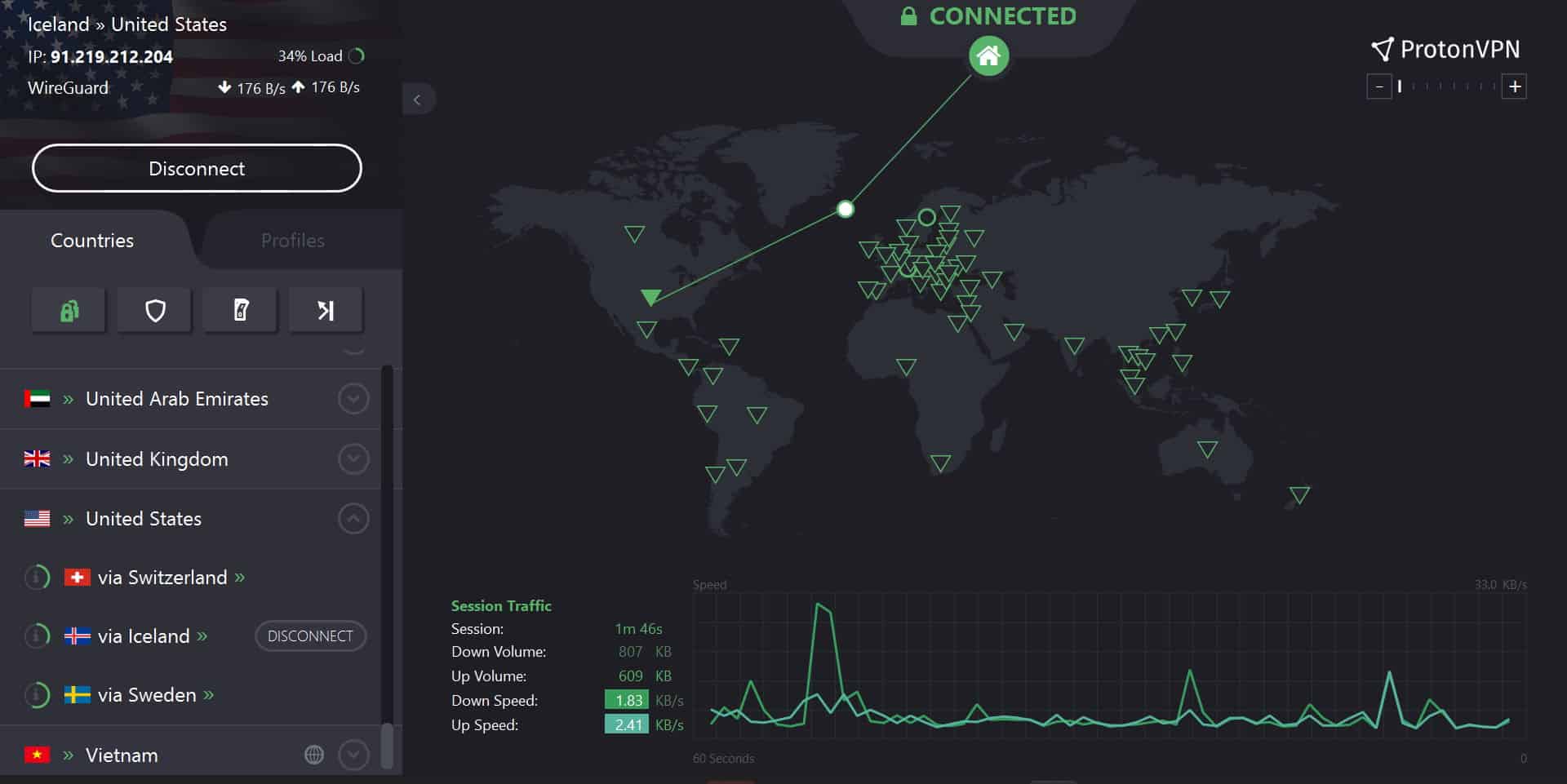
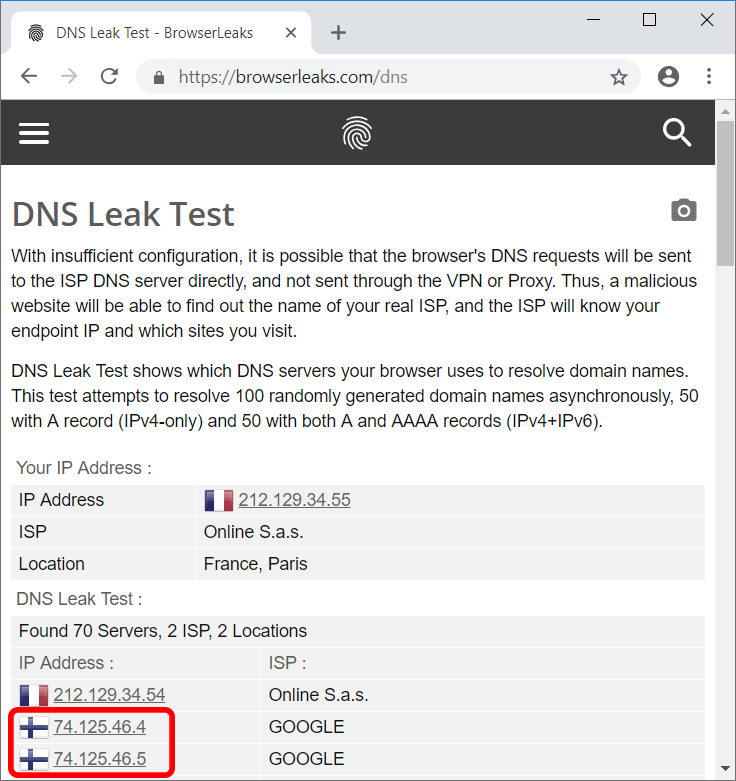
I run ProtonVPN alongside everything else. Not really for OPSEC but for how it handles DNS leaks. Just match your VPN location to your proxys country. That way even if something leaks all the traffic looks like its coming from the same place. Clean and consistent.
Sample of an exposed DNS leak if you don't match the country VPN with your proxy:
Conclusion
Thats my personal carding setup for 2025 - anti-detect browsers and proxies and the tools to blend in and get your transactions through. With AI fraud detection on the rise merchants are stepping up their game but that means bigger scores for those who adapt.
This setup is just a starting point. Youll find your own rhythm maybe a different browser or a new tool. This game is about constant evolution. As such expect that I will update this as I change my own setup from time to time.
As always: stay ahead of the curve. Complacency gets you busted. Keep your tools sharp your OPSEC tight and never stop learning. Every fuck up is a lesson every hit is experience.
The digital world is a fucking jungle but with the right knowledge preparation and a healthy dose of paranoia you can navigate it. In 2025 the biggest scores go to those who adapt.
Stay dangerous stay smart and may your cards hit clean. Heres to a profitable 2025 you degenerate fucks. d0ctrine out.
osbcracken
Carding Novice
- Joined
- 08.05.25
- Messages
- 10
- Reaction score
- 0
- Points
- 1
ty bro
eddie94888
Carding Novice
- Joined
- 18.12.25
- Messages
- 18
- Reaction score
- 0
- Points
- 1
G
Suratastic
Carding Novice
- Joined
- 20.12.25
- Messages
- 3
- Reaction score
- 0
- Points
- 1
Thanks!View attachment 51543
? d0c's Carding Setup for 2025 ?
A lot of you newcomers keep blowing up my inbox asking the same old shit: 'd0ctrine whats your setup? What proxy provider do you use? What anti-detect do you use?' You know what? Im sick of it. So I said 'Fuck it' and wrote this guide. This is the shit I personally use and why I use it. Hopefully this will fatten your wallets as you navigate the tough times of carding this coming 2025.
Understanding the Setup
If youve been paying any attention to my guides you know Im a huge fucking proponent of the iPhone as a carding device. Ive talked about why its the tits extensively on here:
? The iPhone: A Carder's Ultimate Tool ?
So it should be no surprise that 60% of all my carding is done with an iPhone. But telling you to just buy an iPhone would be a massive letdown right? So for the remaining 40% where I use my laptop this guide will break down my setup. Most of the tools and services here are cross-platform meaning you can use them on any OS but to get the best results and highest success rate I recommend sticking with Apple devices. They give you low entropy since most devices look the same so you get a large margin of error when carding.
Proxy Provider
I switch up proxy providers like a paranoid dealer changes burner phones. There are plenty of reasons to do this but for the longest damn time Ive been riding with SmartProxy.
LINK TO SMARTPROXY
Why? Because it hits four of my must-have criteria:
- Large Pool of Proxies: The bigger the pool the better. This pool is shared among all users so a larger pool means less chance of running into some other jackass using the same IP raising red flags.
- Fast and Reliable: Ive had other proxy providers shit the bed mid-carding session forcing me to switch IPs and basically waving a giant red flag at the transaction. SmartProxy has been solid keeping me in the game without those fuck-ups.
- ZIP Targeting: Lets be real ZIP codes are the bread and butter of any successful carding operation. The fact that SmartProxy lets you laser-focus on specific ZIPs? Thats a fucking game-changer.
- High Percentage of Unique IPs: Its not just about having the biggest pool. PIA for example has a huge pool but you often end up with the same damn IP multiple times. SmartProxy has a solid percentage of unique IPs which is what you need to stay under the radar.
- Blocks a Shitload of Financial Sites: This is pure fucking gold. If you read my guide on ? Strategic Carding: Getting the Cleanest Possible IPs ? youd know that to get the cleanest proxies you need providers that block financial and banking sites. Then you work around that block. SmartProxy is a fucking champ at this blocking everything from Shopify to Stripe to banking sites.
Unique IPs
View attachment 51545
Alright lets cut through the 'unique IP' marketing crap. Proxyway did a nice experiment to expose the truth about residential proxy pools. They didnt just take these providers inflated claims at face value. They put them to the test hammering them with hundreds of thousands of requests and cross-referencing the IPs with MaxMind and IP2Location.
They wanted to find out how many unique IPs each provider actually delivered how many were on different C-level subnets (important to avoid getting your ass blocked) and whether they were legit residential addresses.
SMARTPROXY
View attachment 51546
Smartproxy came out on top boasting 57% unique IPs with 37% on unique C-class subnetworks. They claim 10 million IPs and these numbers suggest theyre not entirely full of shit. Oxylabs was a close second but the rest? Fucking embarrassing. Luminati the supposed king of the hill only managed a pathetic 15% unique IPs. RSocks and PacketStream fared even worse. NetNut had a decent number of unique IPs but almost all were on the same subnet. Most other proxy fuckers just resell from these larger pools, so they are more or less the same shit.
OXYLABS
View attachment 51547
NETNUT
View attachment 51548
The bottom line? Most of these providers are inflating their numbers. Theyre probably counting IPs over weeks or months not whats available at any given moment. Smartproxy seems to be the least deceptive but always grill these providers on how they calculate their pool size before you hand over your hard-earned cash.
Smartproxy Script
Look Im all about efficiency. Aint nobody got time to manually configure proxies every damn time. So to make my life easier I whipped up a little script that I run in my terminal. I just punch in the ZIP code I want and boom I get a fresh IP.
View attachment 51552
Usually Smartproxy uses this format:
Code:user-${username}-session-${session}-sessionduration-60-country-us-zip-${zipcode}:${password}@gate.smartproxy.com:7000
But Im a genius so I made a script that automates this. Heres the code:
Bash Script (Mac/Linux)
View attachment 51551
Code:#!/bin/bash # Your Smartproxy username and password username='YOUR_USERNAME' password='YOUR_PASSWORD' # Check if ZIP code argument is provided if [ $# -ne 1 ]; then echo 'Error: Please provide a ZIP code as argument' echo 'Usage: $0 <zipcode>' exit 1 fi # Store ZIP code from command line argument zipcode=$1 # Generate random 8-digit session number session=$(printf '%08d' $(($RANDOM % 100000000))) # Generate proxy string proxy_str='user-${username}-session-${session}-sessionduration-60-country-us-zip-${zipcode}:${password}@gate.smartproxy.com:7000' # Test the proxy echo '=== Proxy IP Information ===' curl -s --proxy 'https://${proxy_str}' ip-api.com/json | jq . echo echo '=== Proxy Configuration ===' echo '${proxy_str}'
How to Use It (Mac):
- Save this script as `prox.sh` somewhere on your Mac.
- Open Terminal and navigate to where you saved the script.
- Make it executable: `chmod +x prox.sh`
- Run it: `bash prox.sh 90210` (replace 90210 with your desired ZIP).
For the Windows Gang:
You can use PowerShell for a similar script:
*** Hidden text: cannot be quoted. ***
How to Use It (Windows):
- Save this as `prox.ps1`.
- Open PowerShell as an administrator.
- Navigate to the scripts location.
- Run it: `.\prox.ps1 10001` (replace 10001 with your ZIP).
Important: Dont forget to replace `'YOUR_USERNAME'` and `'YOUR_PASSWORD'` with your actual Smartproxy credentials in both scripts. Also make sure you have `curl` installed on your Mac and that PowerShell has the necessary permissions to make web requests.
Antidetects
Ive burned through more antidetect browsers than I care to count but only two have proven their worth: GoLogin and Linken Sphere. Dont worry Ill drop a detailed analysis of every antidetect browser Ive tested soon but for now lets focus on what actually works especially if youre running a Mac setup.
LINK TO LINKEN SPHERE
These days I exclusively roll with Linken Sphere. Why? Simple - its the only one that consistently plays nice with custom DNS settings which you absolutely need when dealing with SmartProxy's blocked sites. Their hybrid fingerprinting option keeps my entropy stable and lets me blend in with the normies without raising any red flags.
View attachment 51554
Another killer feature in Linken Sphere is profile warming. Before hitting your target sites especially with logs you can build trust by automating normal browsing patterns - product searches wishlist adds review reading. Mix up the sites you visit and let profiles age for a few days. Fresh profiles scream fraud but ones with established browsing history blend right in with legitimate traffic.
View attachment 51553
The results speak for themselves - my success rate has been solid and Im betting this setup will only get more effective as we push through 2025. When youre dealing with sophisticated antifraud systems having a reliable antidetect isnt just nice to have - its fucking essential.
? Other Tools
Of course my carding setup wouldnt be complete without these bad boys.
Site Analysis:
Fingerprint Checks:
- Caido: Your best friend for picking apart websites. When you need to understand how a site works and how its security operates.
- Burp Suite: The heavyweight champion of web testing. This beast does everything - intercepting and reconaissance you name it.
- demo.fingerprint.com: Simple but effective. Shows you exactly what sites see when you visit them.
- creepjs: Gets into the nitty-gritty of your browser fingerprint. Youll be shocked at how much data youre giving away.
- fv.pro: Solid fingerprint checker that breaks down your digital signature piece by piece.
- browserleaks: The full package for seeing what info your browser spills. Trust me its more than you think.
IP Checks:
- IPQS (IPQualityScore): Your first line of defense. If your IP is burned IPQS will tell you before you waste your time trying cards.
- Scamalytics: Decent backup for IP checking. Not quite IPQS level but still worth having in your toolkit.
Pro tip: Hook your IPQS API key up to Linken Sphere. Itll watch your IP reputation automatically - saves you a ton of headache and manual checks.
VPN
I run ProtonVPN alongside everything else. Not really for OPSEC but for how it handles DNS leaks. Just match your VPN location to your proxys country. That way even if something leaks all the traffic looks like its coming from the same place. Clean and consistent.
Sample of an exposed DNS leak if you don't match the country VPN with your proxy:
Conclusion
Thats my personal carding setup for 2025 - anti-detect browsers and proxies and the tools to blend in and get your transactions through. With AI fraud detection on the rise merchants are stepping up their game but that means bigger scores for those who adapt.
This setup is just a starting point. Youll find your own rhythm maybe a different browser or a new tool. This game is about constant evolution. As such expect that I will update this as I change my own setup from time to time.
As always: stay ahead of the curve. Complacency gets you busted. Keep your tools sharp your OPSEC tight and never stop learning. Every fuck up is a lesson every hit is experience.
The digital world is a fucking jungle but with the right knowledge preparation and a healthy dose of paranoia you can navigate it. In 2025 the biggest scores go to those who adapt.
Stay dangerous stay smart and may your cards hit clean. Heres to a profitable 2025 you degenerate fucks. d0ctrine out.
Lowkey3124
Carding Novice
- Joined
- 19.01.25
- Messages
- 8
- Reaction score
- 0
- Points
- 1
ba
View attachment 51543
? d0c's Carding Setup for 2025 ?
A lot of you newcomers keep blowing up my inbox asking the same old shit: 'd0ctrine whats your setup? What proxy provider do you use? What anti-detect do you use?' You know what? Im sick of it. So I said 'Fuck it' and wrote this guide. This is the shit I personally use and why I use it. Hopefully this will fatten your wallets as you navigate the tough times of carding this coming 2025.
Understanding the Setup
If youve been paying any attention to my guides you know Im a huge fucking proponent of the iPhone as a carding device. Ive talked about why its the tits extensively on here:
? The iPhone: A Carder's Ultimate Tool ?
So it should be no surprise that 60% of all my carding is done with an iPhone. But telling you to just buy an iPhone would be a massive letdown right? So for the remaining 40% where I use my laptop this guide will break down my setup. Most of the tools and services here are cross-platform meaning you can use them on any OS but to get the best results and highest success rate I recommend sticking with Apple devices. They give you low entropy since most devices look the same so you get a large margin of error when carding.
Proxy Provider
I switch up proxy providers like a paranoid dealer changes burner phones. There are plenty of reasons to do this but for the longest damn time Ive been riding with SmartProxy.
LINK TO SMARTPROXY
Why? Because it hits four of my must-have criteria:
- Large Pool of Proxies: The bigger the pool the better. This pool is shared among all users so a larger pool means less chance of running into some other jackass using the same IP raising red flags.
- Fast and Reliable: Ive had other proxy providers shit the bed mid-carding session forcing me to switch IPs and basically waving a giant red flag at the transaction. SmartProxy has been solid keeping me in the game without those fuck-ups.
- ZIP Targeting: Lets be real ZIP codes are the bread and butter of any successful carding operation. The fact that SmartProxy lets you laser-focus on specific ZIPs? Thats a fucking game-changer.
- High Percentage of Unique IPs: Its not just about having the biggest pool. PIA for example has a huge pool but you often end up with the same damn IP multiple times. SmartProxy has a solid percentage of unique IPs which is what you need to stay under the radar.
- Blocks a Shitload of Financial Sites: This is pure fucking gold. If you read my guide on ? Strategic Carding: Getting the Cleanest Possible IPs ? youd know that to get the cleanest proxies you need providers that block financial and banking sites. Then you work around that block. SmartProxy is a fucking champ at this blocking everything from Shopify to Stripe to banking sites.
Unique IPs
View attachment 51545
Alright lets cut through the 'unique IP' marketing crap. Proxyway did a nice experiment to expose the truth about residential proxy pools. They didnt just take these providers inflated claims at face value. They put them to the test hammering them with hundreds of thousands of requests and cross-referencing the IPs with MaxMind and IP2Location.
They wanted to find out how many unique IPs each provider actually delivered how many were on different C-level subnets (important to avoid getting your ass blocked) and whether they were legit residential addresses.
SMARTPROXY
View attachment 51546
Smartproxy came out on top boasting 57% unique IPs with 37% on unique C-class subnetworks. They claim 10 million IPs and these numbers suggest theyre not entirely full of shit. Oxylabs was a close second but the rest? Fucking embarrassing. Luminati the supposed king of the hill only managed a pathetic 15% unique IPs. RSocks and PacketStream fared even worse. NetNut had a decent number of unique IPs but almost all were on the same subnet. Most other proxy fuckers just resell from these larger pools, so they are more or less the same shit.
OXYLABS
View attachment 51547
NETNUT
View attachment 51548
The bottom line? Most of these providers are inflating their numbers. Theyre probably counting IPs over weeks or months not whats available at any given moment. Smartproxy seems to be the least deceptive but always grill these providers on how they calculate their pool size before you hand over your hard-earned cash.
Smartproxy Script
Look Im all about efficiency. Aint nobody got time to manually configure proxies every damn time. So to make my life easier I whipped up a little script that I run in my terminal. I just punch in the ZIP code I want and boom I get a fresh IP.
View attachment 51552
Usually Smartproxy uses this format:
Code:user-${username}-session-${session}-sessionduration-60-country-us-zip-${zipcode}:${password}@gate.smartproxy.com:7000
But Im a genius so I made a script that automates this. Heres the code:
Bash Script (Mac/Linux)
View attachment 51551
Code:#!/bin/bash # Your Smartproxy username and password username='YOUR_USERNAME' password='YOUR_PASSWORD' # Check if ZIP code argument is provided if [ $# -ne 1 ]; then echo 'Error: Please provide a ZIP code as argument' echo 'Usage: $0 <zipcode>' exit 1 fi # Store ZIP code from command line argument zipcode=$1 # Generate random 8-digit session number session=$(printf '%08d' $(($RANDOM % 100000000))) # Generate proxy string proxy_str='user-${username}-session-${session}-sessionduration-60-country-us-zip-${zipcode}:${password}@gate.smartproxy.com:7000' # Test the proxy echo '=== Proxy IP Information ===' curl -s --proxy 'https://${proxy_str}' ip-api.com/json | jq . echo echo '=== Proxy Configuration ===' echo '${proxy_str}'
How to Use It (Mac):
- Save this script as `prox.sh` somewhere on your Mac.
- Open Terminal and navigate to where you saved the script.
- Make it executable: `chmod +x prox.sh`
- Run it: `bash prox.sh 90210` (replace 90210 with your desired ZIP).
For the Windows Gang:
You can use PowerShell for a similar script:
*** Hidden text: cannot be quoted. ***
How to Use It (Windows):
- Save this as `prox.ps1`.
- Open PowerShell as an administrator.
- Navigate to the scripts location.
- Run it: `.\prox.ps1 10001` (replace 10001 with your ZIP).
Important: Dont forget to replace `'YOUR_USERNAME'` and `'YOUR_PASSWORD'` with your actual Smartproxy credentials in both scripts. Also make sure you have `curl` installed on your Mac and that PowerShell has the necessary permissions to make web requests.
Antidetects
Ive burned through more antidetect browsers than I care to count but only two have proven their worth: GoLogin and Linken Sphere. Dont worry Ill drop a detailed analysis of every antidetect browser Ive tested soon but for now lets focus on what actually works especially if youre running a Mac setup.
LINK TO LINKEN SPHERE
These days I exclusively roll with Linken Sphere. Why? Simple - its the only one that consistently plays nice with custom DNS settings which you absolutely need when dealing with SmartProxy's blocked sites. Their hybrid fingerprinting option keeps my entropy stable and lets me blend in with the normies without raising any red flags.
View attachment 51554
Another killer feature in Linken Sphere is profile warming. Before hitting your target sites especially with logs you can build trust by automating normal browsing patterns - product searches wishlist adds review reading. Mix up the sites you visit and let profiles age for a few days. Fresh profiles scream fraud but ones with established browsing history blend right in with legitimate traffic.
View attachment 51553
The results speak for themselves - my success rate has been solid and Im betting this setup will only get more effective as we push through 2025. When youre dealing with sophisticated antifraud systems having a reliable antidetect isnt just nice to have - its fucking essential.
? Other Tools
Of course my carding setup wouldnt be complete without these bad boys.
Site Analysis:
Fingerprint Checks:
- Caido: Your best friend for picking apart websites. When you need to understand how a site works and how its security operates.
- Burp Suite: The heavyweight champion of web testing. This beast does everything - intercepting and reconaissance you name it.
- demo.fingerprint.com: Simple but effective. Shows you exactly what sites see when you visit them.
- creepjs: Gets into the nitty-gritty of your browser fingerprint. Youll be shocked at how much data youre giving away.
- fv.pro: Solid fingerprint checker that breaks down your digital signature piece by piece.
- browserleaks: The full package for seeing what info your browser spills. Trust me its more than you think.
IP Checks:
- IPQS (IPQualityScore): Your first line of defense. If your IP is burned IPQS will tell you before you waste your time trying cards.
- Scamalytics: Decent backup for IP checking. Not quite IPQS level but still worth having in your toolkit.
Pro tip: Hook your IPQS API key up to Linken Sphere. Itll watch your IP reputation automatically - saves you a ton of headache and manual checks.
VPN
I run ProtonVPN alongside everything else. Not really for OPSEC but for how it handles DNS leaks. Just match your VPN location to your proxys country. That way even if something leaks all the traffic looks like its coming from the same place. Clean and consistent.
Sample of an exposed DNS leak if you don't match the country VPN with your proxy:
Conclusion
Thats my personal carding setup for 2025 - anti-detect browsers and proxies and the tools to blend in and get your transactions through. With AI fraud detection on the rise merchants are stepping up their game but that means bigger scores for those who adapt.
This setup is just a starting point. Youll find your own rhythm maybe a different browser or a new tool. This game is about constant evolution. As such expect that I will update this as I change my own setup from time to time.
As always: stay ahead of the curve. Complacency gets you busted. Keep your tools sharp your OPSEC tight and never stop learning. Every fuck up is a lesson every hit is experience.
The digital world is a fucking jungle but with the right knowledge preparation and a healthy dose of paranoia you can navigate it. In 2025 the biggest scores go to those who adapt.
Stay dangerous stay smart and may your cards hit clean. Heres to a profitable 2025 you degenerate fucks. d0ctrine out.gang
doctrine i hope u reply and read this i have a simple question i understand u be busy so u dont have time to respond or chat with most but thats fine one day ill get the conversation i want out u for now though i ask can u tell me for macbook if i have a personal macbook i use and wanna deck it out with stuff shall i use a vm when doing anything or make a new broswerstack everytime or do everything on my regular mac just make sure before i boot up or load into anything that would track me im secured like set proxies and vpns to auto route when i turn on
fullzseller
Carding Crew Leader
- Joined
- 10.09.24
- Messages
- 121
- Reaction score
- 11
- Points
- 18
nice
dreamchhaser
Carding Novice
- Joined
- 30.12.25
- Messages
- 12
- Reaction score
- 0
- Points
- 1
Thanks ALOT <3View attachment 51543
? d0c's Carding Setup for 2025 ?
A lot of you newcomers keep blowing up my inbox asking the same old shit: 'd0ctrine whats your setup? What proxy provider do you use? What anti-detect do you use?' You know what? Im sick of it. So I said 'Fuck it' and wrote this guide. This is the shit I personally use and why I use it. Hopefully this will fatten your wallets as you navigate the tough times of carding this coming 2025.
Understanding the Setup
If youve been paying any attention to my guides you know Im a huge fucking proponent of the iPhone as a carding device. Ive talked about why its the tits extensively on here:
? The iPhone: A Carder's Ultimate Tool ?
So it should be no surprise that 60% of all my carding is done with an iPhone. But telling you to just buy an iPhone would be a massive letdown right? So for the remaining 40% where I use my laptop this guide will break down my setup. Most of the tools and services here are cross-platform meaning you can use them on any OS but to get the best results and highest success rate I recommend sticking with Apple devices. They give you low entropy since most devices look the same so you get a large margin of error when carding.
Proxy Provider
I switch up proxy providers like a paranoid dealer changes burner phones. There are plenty of reasons to do this but for the longest damn time Ive been riding with SmartProxy.
LINK TO SMARTPROXY
Why? Because it hits four of my must-have criteria:
- Large Pool of Proxies: The bigger the pool the better. This pool is shared among all users so a larger pool means less chance of running into some other jackass using the same IP raising red flags.
- Fast and Reliable: Ive had other proxy providers shit the bed mid-carding session forcing me to switch IPs and basically waving a giant red flag at the transaction. SmartProxy has been solid keeping me in the game without those fuck-ups.
- ZIP Targeting: Lets be real ZIP codes are the bread and butter of any successful carding operation. The fact that SmartProxy lets you laser-focus on specific ZIPs? Thats a fucking game-changer.
- High Percentage of Unique IPs: Its not just about having the biggest pool. PIA for example has a huge pool but you often end up with the same damn IP multiple times. SmartProxy has a solid percentage of unique IPs which is what you need to stay under the radar.
- Blocks a Shitload of Financial Sites: This is pure fucking gold. If you read my guide on ? Strategic Carding: Getting the Cleanest Possible IPs ? youd know that to get the cleanest proxies you need providers that block financial and banking sites. Then you work around that block. SmartProxy is a fucking champ at this blocking everything from Shopify to Stripe to banking sites.
Unique IPs
View attachment 51545
Alright lets cut through the 'unique IP' marketing crap. Proxyway did a nice experiment to expose the truth about residential proxy pools. They didnt just take these providers inflated claims at face value. They put them to the test hammering them with hundreds of thousands of requests and cross-referencing the IPs with MaxMind and IP2Location.
They wanted to find out how many unique IPs each provider actually delivered how many were on different C-level subnets (important to avoid getting your ass blocked) and whether they were legit residential addresses.
SMARTPROXY
View attachment 51546
Smartproxy came out on top boasting 57% unique IPs with 37% on unique C-class subnetworks. They claim 10 million IPs and these numbers suggest theyre not entirely full of shit. Oxylabs was a close second but the rest? Fucking embarrassing. Luminati the supposed king of the hill only managed a pathetic 15% unique IPs. RSocks and PacketStream fared even worse. NetNut had a decent number of unique IPs but almost all were on the same subnet. Most other proxy fuckers just resell from these larger pools, so they are more or less the same shit.
OXYLABS
View attachment 51547
NETNUT
View attachment 51548
The bottom line? Most of these providers are inflating their numbers. Theyre probably counting IPs over weeks or months not whats available at any given moment. Smartproxy seems to be the least deceptive but always grill these providers on how they calculate their pool size before you hand over your hard-earned cash.
Smartproxy Script
Look Im all about efficiency. Aint nobody got time to manually configure proxies every damn time. So to make my life easier I whipped up a little script that I run in my terminal. I just punch in the ZIP code I want and boom I get a fresh IP.
View attachment 51552
Usually Smartproxy uses this format:
Code:user-${username}-session-${session}-sessionduration-60-country-us-zip-${zipcode}:${password}@gate.smartproxy.com:7000
But Im a genius so I made a script that automates this. Heres the code:
Bash Script (Mac/Linux)
View attachment 51551
Code:#!/bin/bash # Your Smartproxy username and password username='YOUR_USERNAME' password='YOUR_PASSWORD' # Check if ZIP code argument is provided if [ $# -ne 1 ]; then echo 'Error: Please provide a ZIP code as argument' echo 'Usage: $0 <zipcode>' exit 1 fi # Store ZIP code from command line argument zipcode=$1 # Generate random 8-digit session number session=$(printf '%08d' $(($RANDOM % 100000000))) # Generate proxy string proxy_str='user-${username}-session-${session}-sessionduration-60-country-us-zip-${zipcode}:${password}@gate.smartproxy.com:7000' # Test the proxy echo '=== Proxy IP Information ===' curl -s --proxy 'https://${proxy_str}' ip-api.com/json | jq . echo echo '=== Proxy Configuration ===' echo '${proxy_str}'
How to Use It (Mac):
- Save this script as `prox.sh` somewhere on your Mac.
- Open Terminal and navigate to where you saved the script.
- Make it executable: `chmod +x prox.sh`
- Run it: `bash prox.sh 90210` (replace 90210 with your desired ZIP).
For the Windows Gang:
You can use PowerShell for a similar script:
*** Hidden text: cannot be quoted. ***
How to Use It (Windows):
- Save this as `prox.ps1`.
- Open PowerShell as an administrator.
- Navigate to the scripts location.
- Run it: `.\prox.ps1 10001` (replace 10001 with your ZIP).
Important: Dont forget to replace `'YOUR_USERNAME'` and `'YOUR_PASSWORD'` with your actual Smartproxy credentials in both scripts. Also make sure you have `curl` installed on your Mac and that PowerShell has the necessary permissions to make web requests.
Antidetects
Ive burned through more antidetect browsers than I care to count but only two have proven their worth: GoLogin and Linken Sphere. Dont worry Ill drop a detailed analysis of every antidetect browser Ive tested soon but for now lets focus on what actually works especially if youre running a Mac setup.
LINK TO LINKEN SPHERE
These days I exclusively roll with Linken Sphere. Why? Simple - its the only one that consistently plays nice with custom DNS settings which you absolutely need when dealing with SmartProxy's blocked sites. Their hybrid fingerprinting option keeps my entropy stable and lets me blend in with the normies without raising any red flags.
View attachment 51554
Another killer feature in Linken Sphere is profile warming. Before hitting your target sites especially with logs you can build trust by automating normal browsing patterns - product searches wishlist adds review reading. Mix up the sites you visit and let profiles age for a few days. Fresh profiles scream fraud but ones with established browsing history blend right in with legitimate traffic.
View attachment 51553
The results speak for themselves - my success rate has been solid and Im betting this setup will only get more effective as we push through 2025. When youre dealing with sophisticated antifraud systems having a reliable antidetect isnt just nice to have - its fucking essential.
? Other Tools
Of course my carding setup wouldnt be complete without these bad boys.
Site Analysis:
Fingerprint Checks:
- Caido: Your best friend for picking apart websites. When you need to understand how a site works and how its security operates.
- Burp Suite: The heavyweight champion of web testing. This beast does everything - intercepting and reconaissance you name it.
- demo.fingerprint.com: Simple but effective. Shows you exactly what sites see when you visit them.
- creepjs: Gets into the nitty-gritty of your browser fingerprint. Youll be shocked at how much data youre giving away.
- fv.pro: Solid fingerprint checker that breaks down your digital signature piece by piece.
- browserleaks: The full package for seeing what info your browser spills. Trust me its more than you think.
IP Checks:
- IPQS (IPQualityScore): Your first line of defense. If your IP is burned IPQS will tell you before you waste your time trying cards.
- Scamalytics: Decent backup for IP checking. Not quite IPQS level but still worth having in your toolkit.
Pro tip: Hook your IPQS API key up to Linken Sphere. Itll watch your IP reputation automatically - saves you a ton of headache and manual checks.
VPN
I run ProtonVPN alongside everything else. Not really for OPSEC but for how it handles DNS leaks. Just match your VPN location to your proxys country. That way even if something leaks all the traffic looks like its coming from the same place. Clean and consistent.
Sample of an exposed DNS leak if you don't match the country VPN with your proxy:
Conclusion
Thats my personal carding setup for 2025 - anti-detect browsers and proxies and the tools to blend in and get your transactions through. With AI fraud detection on the rise merchants are stepping up their game but that means bigger scores for those who adapt.
This setup is just a starting point. Youll find your own rhythm maybe a different browser or a new tool. This game is about constant evolution. As such expect that I will update this as I change my own setup from time to time.
As always: stay ahead of the curve. Complacency gets you busted. Keep your tools sharp your OPSEC tight and never stop learning. Every fuck up is a lesson every hit is experience.
The digital world is a fucking jungle but with the right knowledge preparation and a healthy dose of paranoia you can navigate it. In 2025 the biggest scores go to those who adapt.
Stay dangerous stay smart and may your cards hit clean. Heres to a profitable 2025 you degenerate fucks. d0ctrine out.
ReplyView attachment 51543
? d0c's Carding Setup for 2025 ?
A lot of you newcomers keep blowing up my inbox asking the same old shit: 'd0ctrine whats your setup? What proxy provider do you use? What anti-detect do you use?' You know what? Im sick of it. So I said 'Fuck it' and wrote this guide. This is the shit I personally use and why I use it. Hopefully this will fatten your wallets as you navigate the tough times of carding this coming 2025.
Understanding the Setup
If youve been paying any attention to my guides you know Im a huge fucking proponent of the iPhone as a carding device. Ive talked about why its the tits extensively on here:
? The iPhone: A Carder's Ultimate Tool ?
So it should be no surprise that 60% of all my carding is done with an iPhone. But telling you to just buy an iPhone would be a massive letdown right? So for the remaining 40% where I use my laptop this guide will break down my setup. Most of the tools and services here are cross-platform meaning you can use them on any OS but to get the best results and highest success rate I recommend sticking with Apple devices. They give you low entropy since most devices look the same so you get a large margin of error when carding.
Proxy Provider
I switch up proxy providers like a paranoid dealer changes burner phones. There are plenty of reasons to do this but for the longest damn time Ive been riding with SmartProxy.
LINK TO SMARTPROXY
Why? Because it hits four of my must-have criteria:
- Large Pool of Proxies: The bigger the pool the better. This pool is shared among all users so a larger pool means less chance of running into some other jackass using the same IP raising red flags.
- Fast and Reliable: Ive had other proxy providers shit the bed mid-carding session forcing me to switch IPs and basically waving a giant red flag at the transaction. SmartProxy has been solid keeping me in the game without those fuck-ups.
- ZIP Targeting: Lets be real ZIP codes are the bread and butter of any successful carding operation. The fact that SmartProxy lets you laser-focus on specific ZIPs? Thats a fucking game-changer.
- High Percentage of Unique IPs: Its not just about having the biggest pool. PIA for example has a huge pool but you often end up with the same damn IP multiple times. SmartProxy has a solid percentage of unique IPs which is what you need to stay under the radar.
- Blocks a Shitload of Financial Sites: This is pure fucking gold. If you read my guide on ? Strategic Carding: Getting the Cleanest Possible IPs ? youd know that to get the cleanest proxies you need providers that block financial and banking sites. Then you work around that block. SmartProxy is a fucking champ at this blocking everything from Shopify to Stripe to banking sites.
Unique IPs
View attachment 51545
Alright lets cut through the 'unique IP' marketing crap. Proxyway did a nice experiment to expose the truth about residential proxy pools. They didnt just take these providers inflated claims at face value. They put them to the test hammering them with hundreds of thousands of requests and cross-referencing the IPs with MaxMind and IP2Location.
They wanted to find out how many unique IPs each provider actually delivered how many were on different C-level subnets (important to avoid getting your ass blocked) and whether they were legit residential addresses.
SMARTPROXY
View attachment 51546
Smartproxy came out on top boasting 57% unique IPs with 37% on unique C-class subnetworks. They claim 10 million IPs and these numbers suggest theyre not entirely full of shit. Oxylabs was a close second but the rest? Fucking embarrassing. Luminati the supposed king of the hill only managed a pathetic 15% unique IPs. RSocks and PacketStream fared even worse. NetNut had a decent number of unique IPs but almost all were on the same subnet. Most other proxy fuckers just resell from these larger pools, so they are more or less the same shit.
OXYLABS
View attachment 51547
NETNUT
View attachment 51548
The bottom line? Most of these providers are inflating their numbers. Theyre probably counting IPs over weeks or months not whats available at any given moment. Smartproxy seems to be the least deceptive but always grill these providers on how they calculate their pool size before you hand over your hard-earned cash.
Smartproxy Script
Look Im all about efficiency. Aint nobody got time to manually configure proxies every damn time. So to make my life easier I whipped up a little script that I run in my terminal. I just punch in the ZIP code I want and boom I get a fresh IP.
View attachment 51552
Usually Smartproxy uses this format:
Code:user-${username}-session-${session}-sessionduration-60-country-us-zip-${zipcode}:${password}@gate.smartproxy.com:7000
But Im a genius so I made a script that automates this. Heres the code:
Bash Script (Mac/Linux)
View attachment 51551
Code:#!/bin/bash # Your Smartproxy username and password username='YOUR_USERNAME' password='YOUR_PASSWORD' # Check if ZIP code argument is provided if [ $# -ne 1 ]; then echo 'Error: Please provide a ZIP code as argument' echo 'Usage: $0 <zipcode>' exit 1 fi # Store ZIP code from command line argument zipcode=$1 # Generate random 8-digit session number session=$(printf '%08d' $(($RANDOM % 100000000))) # Generate proxy string proxy_str='user-${username}-session-${session}-sessionduration-60-country-us-zip-${zipcode}:${password}@gate.smartproxy.com:7000' # Test the proxy echo '=== Proxy IP Information ===' curl -s --proxy 'https://${proxy_str}' ip-api.com/json | jq . echo echo '=== Proxy Configuration ===' echo '${proxy_str}'
How to Use It (Mac):
- Save this script as `prox.sh` somewhere on your Mac.
- Open Terminal and navigate to where you saved the script.
- Make it executable: `chmod +x prox.sh`
- Run it: `bash prox.sh 90210` (replace 90210 with your desired ZIP).
For the Windows Gang:
You can use PowerShell for a similar script:
*** Hidden text: cannot be quoted. ***
How to Use It (Windows):
- Save this as `prox.ps1`.
- Open PowerShell as an administrator.
- Navigate to the scripts location.
- Run it: `.\prox.ps1 10001` (replace 10001 with your ZIP).
Important: Dont forget to replace `'YOUR_USERNAME'` and `'YOUR_PASSWORD'` with your actual Smartproxy credentials in both scripts. Also make sure you have `curl` installed on your Mac and that PowerShell has the necessary permissions to make web requests.
Antidetects
Ive burned through more antidetect browsers than I care to count but only two have proven their worth: GoLogin and Linken Sphere. Dont worry Ill drop a detailed analysis of every antidetect browser Ive tested soon but for now lets focus on what actually works especially if youre running a Mac setup.
LINK TO LINKEN SPHERE
These days I exclusively roll with Linken Sphere. Why? Simple - its the only one that consistently plays nice with custom DNS settings which you absolutely need when dealing with SmartProxy's blocked sites. Their hybrid fingerprinting option keeps my entropy stable and lets me blend in with the normies without raising any red flags.
View attachment 51554
Another killer feature in Linken Sphere is profile warming. Before hitting your target sites especially with logs you can build trust by automating normal browsing patterns - product searches wishlist adds review reading. Mix up the sites you visit and let profiles age for a few days. Fresh profiles scream fraud but ones with established browsing history blend right in with legitimate traffic.
View attachment 51553
The results speak for themselves - my success rate has been solid and Im betting this setup will only get more effective as we push through 2025. When youre dealing with sophisticated antifraud systems having a reliable antidetect isnt just nice to have - its fucking essential.
? Other Tools
Of course my carding setup wouldnt be complete without these bad boys.
Site Analysis:
Fingerprint Checks:
- Caido: Your best friend for picking apart websites. When you need to understand how a site works and how its security operates.
- Burp Suite: The heavyweight champion of web testing. This beast does everything - intercepting and reconaissance you name it.
- demo.fingerprint.com: Simple but effective. Shows you exactly what sites see when you visit them.
- creepjs: Gets into the nitty-gritty of your browser fingerprint. Youll be shocked at how much data youre giving away.
- fv.pro: Solid fingerprint checker that breaks down your digital signature piece by piece.
- browserleaks: The full package for seeing what info your browser spills. Trust me its more than you think.
IP Checks:
- IPQS (IPQualityScore): Your first line of defense. If your IP is burned IPQS will tell you before you waste your time trying cards.
- Scamalytics: Decent backup for IP checking. Not quite IPQS level but still worth having in your toolkit.
Pro tip: Hook your IPQS API key up to Linken Sphere. Itll watch your IP reputation automatically - saves you a ton of headache and manual checks.
VPN
I run ProtonVPN alongside everything else. Not really for OPSEC but for how it handles DNS leaks. Just match your VPN location to your proxys country. That way even if something leaks all the traffic looks like its coming from the same place. Clean and consistent.
Sample of an exposed DNS leak if you don't match the country VPN with your proxy:
Conclusion
Thats my personal carding setup for 2025 - anti-detect browsers and proxies and the tools to blend in and get your transactions through. With AI fraud detection on the rise merchants are stepping up their game but that means bigger scores for those who adapt.
This setup is just a starting point. Youll find your own rhythm maybe a different browser or a new tool. This game is about constant evolution. As such expect that I will update this as I change my own setup from time to time.
As always: stay ahead of the curve. Complacency gets you busted. Keep your tools sharp your OPSEC tight and never stop learning. Every fuck up is a lesson every hit is experience.
The digital world is a fucking jungle but with the right knowledge preparation and a healthy dose of paranoia you can navigate it. In 2025 the biggest scores go to those who adapt.
Stay dangerous stay smart and may your cards hit clean. Heres to a profitable 2025 you degenerate fucks. d0ctrine out.
Gendollar3
Banned
- Joined
- 28.12.25
- Messages
- 3
- Reaction score
- 0
- Points
- 1
View attachment 51543
? d0c's Carding Setup for 2025 ?
A lot of you newcomers keep blowing up my inbox asking the same old shit: 'd0ctrine whats your setup? What proxy provider do you use? What anti-detect do you use?' You know what? Im sick of it. So I said 'Fuck it' and wrote this guide. This is the shit I personally use and why I use it. Hopefully this will fatten your wallets as you navigate the tough times of carding this coming 2025.
Understanding the Setup
If youve been paying any attention to my guides you know Im a huge fucking proponent of the iPhone as a carding device. Ive talked about why its the tits extensively on here:
? The iPhone: A Carder's Ultimate Tool ?
So it should be no surprise that 60% of all my carding is done with an iPhone. But telling you to just buy an iPhone would be a massive letdown right? So for the remaining 40% where I use my laptop this guide will break down my setup. Most of the tools and services here are cross-platform meaning you can use them on any OS but to get the best results and highest success rate I recommend sticking with Apple devices. They give you low entropy since most devices look the same so you get a large margin of error when carding.
Proxy Provider
I switch up proxy providers like a paranoid dealer changes burner phones. There are plenty of reasons to do this but for the longest damn time Ive been riding with SmartProxy.
LINK TO SMARTPROXY
Why? Because it hits four of my must-have criteria:
- Large Pool of Proxies: The bigger the pool the better. This pool is shared among all users so a larger pool means less chance of running into some other jackass using the same IP raising red flags.
- Fast and Reliable: Ive had other proxy providers shit the bed mid-carding session forcing me to switch IPs and basically waving a giant red flag at the transaction. SmartProxy has been solid keeping me in the game without those fuck-ups.
- ZIP Targeting: Lets be real ZIP codes are the bread and butter of any successful carding operation. The fact that SmartProxy lets you laser-focus on specific ZIPs? Thats a fucking game-changer.
- High Percentage of Unique IPs: Its not just about having the biggest pool. PIA for example has a huge pool but you often end up with the same damn IP multiple times. SmartProxy has a solid percentage of unique IPs which is what you need to stay under the radar.
- Blocks a Shitload of Financial Sites: This is pure fucking gold. If you read my guide on ? Strategic Carding: Getting the Cleanest Possible IPs ? youd know that to get the cleanest proxies you need providers that block financial and banking sites. Then you work around that block. SmartProxy is a fucking champ at this blocking everything from Shopify to Stripe to banking sites.
Unique IPs
View attachment 51545
Alright lets cut through the 'unique IP' marketing crap. Proxyway did a nice experiment to expose the truth about residential proxy pools. They didnt just take these providers inflated claims at face value. They put them to the test hammering them with hundreds of thousands of requests and cross-referencing the IPs with MaxMind and IP2Location.
They wanted to find out how many unique IPs each provider actually delivered how many were on different C-level subnets (important to avoid getting your ass blocked) and whether they were legit residential addresses.
SMARTPROXY
View attachment 51546
Smartproxy came out on top boasting 57% unique IPs with 37% on unique C-class subnetworks. They claim 10 million IPs and these numbers suggest theyre not entirely full of shit. Oxylabs was a close second but the rest? Fucking embarrassing. Luminati the supposed king of the hill only managed a pathetic 15% unique IPs. RSocks and PacketStream fared even worse. NetNut had a decent number of unique IPs but almost all were on the same subnet. Most other proxy fuckers just resell from these larger pools, so they are more or less the same shit.
OXYLABS
View attachment 51547
NETNUT
View attachment 51548
The bottom line? Most of these providers are inflating their numbers. Theyre probably counting IPs over weeks or months not whats available at any given moment. Smartproxy seems to be the least deceptive but always grill these providers on how they calculate their pool size before you hand over your hard-earned cash.
Smartproxy Script
Look Im all about efficiency. Aint nobody got time to manually configure proxies every damn time. So to make my life easier I whipped up a little script that I run in my terminal. I just punch in the ZIP code I want and boom I get a fresh IP.
View attachment 51552
Usually Smartproxy uses this format:
Code:user-${username}-session-${session}-sessionduration-60-country-us-zip-${zipcode}:${password}@gate.smartproxy.com:7000
But Im a genius so I made a script that automates this. Heres the code:
Bash Script (Mac/Linux)
View attachment 51551
Code:#!/bin/bash # Your Smartproxy username and password username='YOUR_USERNAME' password='YOUR_PASSWORD' # Check if ZIP code argument is provided if [ $# -ne 1 ]; then echo 'Error: Please provide a ZIP code as argument' echo 'Usage: $0 <zipcode>' exit 1 fi # Store ZIP code from command line argument zipcode=$1 # Generate random 8-digit session number session=$(printf '%08d' $(($RANDOM % 100000000))) # Generate proxy string proxy_str='user-${username}-session-${session}-sessionduration-60-country-us-zip-${zipcode}:${password}@gate.smartproxy.com:7000' # Test the proxy echo '=== Proxy IP Information ===' curl -s --proxy 'https://${proxy_str}' ip-api.com/json | jq . echo echo '=== Proxy Configuration ===' echo '${proxy_str}'
How to Use It (Mac):
- Save this script as `prox.sh` somewhere on your Mac.
- Open Terminal and navigate to where you saved the script.
- Make it executable: `chmod +x prox.sh`
- Run it: `bash prox.sh 90210` (replace 90210 with your desired ZIP).
For the Windows Gang:
You can use PowerShell for a similar script:
*** Hidden text: cannot be quoted. ***
How to Use It (Windows):
- Save this as `prox.ps1`.
- Open PowerShell as an administrator.
- Navigate to the scripts location.
- Run it: `.\prox.ps1 10001` (replace 10001 with your ZIP).
Important: Dont forget to replace `'YOUR_USERNAME'` and `'YOUR_PASSWORD'` with your actual Smartproxy credentials in both scripts. Also make sure you have `curl` installed on your Mac and that PowerShell has the necessary permissions to make web requests.
Antidetects
Ive burned through more antidetect browsers than I care to count but only two have proven their worth: GoLogin and Linken Sphere. Dont worry Ill drop a detailed analysis of every antidetect browser Ive tested soon but for now lets focus on what actually works especially if youre running a Mac setup.
LINK TO LINKEN SPHERE
These days I exclusively roll with Linken Sphere. Why? Simple - its the only one that consistently plays nice with custom DNS settings which you absolutely need when dealing with SmartProxy's blocked sites. Their hybrid fingerprinting option keeps my entropy stable and lets me blend in with the normies without raising any red flags.
View attachment 51554
Another killer feature in Linken Sphere is profile warming. Before hitting your target sites especially with logs you can build trust by automating normal browsing patterns - product searches wishlist adds review reading. Mix up the sites you visit and let profiles age for a few days. Fresh profiles scream fraud but ones with established browsing history blend right in with legitimate traffic.
View attachment 51553
The results speak for themselves - my success rate has been solid and Im betting this setup will only get more effective as we push through 2025. When youre dealing with sophisticated antifraud systems having a reliable antidetect isnt just nice to have - its fucking essential.
? Other Tools
Of course my carding setup wouldnt be complete without these bad boys.
Site Analysis:
Fingerprint Checks:
- Caido: Your best friend for picking apart websites. When you need to understand how a site works and how its security operates.
- Burp Suite: The heavyweight champion of web testing. This beast does everything - intercepting and reconaissance you name it.
- demo.fingerprint.com: Simple but effective. Shows you exactly what sites see when you visit them.
- creepjs: Gets into the nitty-gritty of your browser fingerprint. Youll be shocked at how much data youre giving away.
- fv.pro: Solid fingerprint checker that breaks down your digital signature piece by piece.
- browserleaks: The full package for seeing what info your browser spills. Trust me its more than you think.
IP Checks:
- IPQS (IPQualityScore): Your first line of defense. If your IP is burned IPQS will tell you before you waste your time trying cards.
- Scamalytics: Decent backup for IP checking. Not quite IPQS level but still worth having in your toolkit.
Pro tip: Hook your IPQS API key up to Linken Sphere. Itll watch your IP reputation automatically - saves you a ton of headache and manual checks.
VPN
I run ProtonVPN alongside everything else. Not really for OPSEC but for how it handles DNS leaks. Just match your VPN location to your proxys country. That way even if something leaks all the traffic looks like its coming from the same place. Clean and consistent.
Sample of an exposed DNS leak if you don't match the country VPN with your proxy:
Conclusion
Thats my personal carding setup for 2025 - anti-detect browsers and proxies and the tools to blend in and get your transactions through. With AI fraud detection on the rise merchants are stepping up their game but that means bigger scores for those who adapt.
This setup is just a starting point. Youll find your own rhythm maybe a different browser or a new tool. This game is about constant evolution. As such expect that I will update this as I change my own setup from time to time.
As always: stay ahead of the curve. Complacency gets you busted. Keep your tools sharp your OPSEC tight and never stop learning. Every fuck up is a lesson every hit is experience.
The digital world is a fucking jungle but with the right knowledge preparation and a healthy dose of paranoia you can navigate it. In 2025 the biggest scores go to those who adapt.
Stay dangerous stay smart and may your cards hit clean. Heres to a profitable 2025 you degenerate fucks. d0ctrine out.
NiceeeeView attachment 51543
? d0c's Carding Setup for 2025 ?
A lot of you newcomers keep blowing up my inbox asking the same old shit: 'd0ctrine whats your setup? What proxy provider do you use? What anti-detect do you use?' You know what? Im sick of it. So I said 'Fuck it' and wrote this guide. This is the shit I personally use and why I use it. Hopefully this will fatten your wallets as you navigate the tough times of carding this coming 2025.
Understanding the Setup
If youve been paying any attention to my guides you know Im a huge fucking proponent of the iPhone as a carding device. Ive talked about why its the tits extensively on here:
? The iPhone: A Carder's Ultimate Tool ?
So it should be no surprise that 60% of all my carding is done with an iPhone. But telling you to just buy an iPhone would be a massive letdown right? So for the remaining 40% where I use my laptop this guide will break down my setup. Most of the tools and services here are cross-platform meaning you can use them on any OS but to get the best results and highest success rate I recommend sticking with Apple devices. They give you low entropy since most devices look the same so you get a large margin of error when carding.
Proxy Provider
I switch up proxy providers like a paranoid dealer changes burner phones. There are plenty of reasons to do this but for the longest damn time Ive been riding with SmartProxy.
LINK TO SMARTPROXY
Why? Because it hits four of my must-have criteria:
- Large Pool of Proxies: The bigger the pool the better. This pool is shared among all users so a larger pool means less chance of running into some other jackass using the same IP raising red flags.
- Fast and Reliable: Ive had other proxy providers shit the bed mid-carding session forcing me to switch IPs and basically waving a giant red flag at the transaction. SmartProxy has been solid keeping me in the game without those fuck-ups.
- ZIP Targeting: Lets be real ZIP codes are the bread and butter of any successful carding operation. The fact that SmartProxy lets you laser-focus on specific ZIPs? Thats a fucking game-changer.
- High Percentage of Unique IPs: Its not just about having the biggest pool. PIA for example has a huge pool but you often end up with the same damn IP multiple times. SmartProxy has a solid percentage of unique IPs which is what you need to stay under the radar.
- Blocks a Shitload of Financial Sites: This is pure fucking gold. If you read my guide on ? Strategic Carding: Getting the Cleanest Possible IPs ? youd know that to get the cleanest proxies you need providers that block financial and banking sites. Then you work around that block. SmartProxy is a fucking champ at this blocking everything from Shopify to Stripe to banking sites.
Unique IPs
View attachment 51545
Alright lets cut through the 'unique IP' marketing crap. Proxyway did a nice experiment to expose the truth about residential proxy pools. They didnt just take these providers inflated claims at face value. They put them to the test hammering them with hundreds of thousands of requests and cross-referencing the IPs with MaxMind and IP2Location.
They wanted to find out how many unique IPs each provider actually delivered how many were on different C-level subnets (important to avoid getting your ass blocked) and whether they were legit residential addresses.
SMARTPROXY
View attachment 51546
Smartproxy came out on top boasting 57% unique IPs with 37% on unique C-class subnetworks. They claim 10 million IPs and these numbers suggest theyre not entirely full of shit. Oxylabs was a close second but the rest? Fucking embarrassing. Luminati the supposed king of the hill only managed a pathetic 15% unique IPs. RSocks and PacketStream fared even worse. NetNut had a decent number of unique IPs but almost all were on the same subnet. Most other proxy fuckers just resell from these larger pools, so they are more or less the same shit.
OXYLABS
View attachment 51547
NETNUT
View attachment 51548
The bottom line? Most of these providers are inflating their numbers. Theyre probably counting IPs over weeks or months not whats available at any given moment. Smartproxy seems to be the least deceptive but always grill these providers on how they calculate their pool size before you hand over your hard-earned cash.
Smartproxy Script
Look Im all about efficiency. Aint nobody got time to manually configure proxies every damn time. So to make my life easier I whipped up a little script that I run in my terminal. I just punch in the ZIP code I want and boom I get a fresh IP.
View attachment 51552
Usually Smartproxy uses this format:
Code:user-${username}-session-${session}-sessionduration-60-country-us-zip-${zipcode}:${password}@gate.smartproxy.com:7000
But Im a genius so I made a script that automates this. Heres the code:
Bash Script (Mac/Linux)
View attachment 51551
Code:#!/bin/bash # Your Smartproxy username and password username='YOUR_USERNAME' password='YOUR_PASSWORD' # Check if ZIP code argument is provided if [ $# -ne 1 ]; then echo 'Error: Please provide a ZIP code as argument' echo 'Usage: $0 <zipcode>' exit 1 fi # Store ZIP code from command line argument zipcode=$1 # Generate random 8-digit session number session=$(printf '%08d' $(($RANDOM % 100000000))) # Generate proxy string proxy_str='user-${username}-session-${session}-sessionduration-60-country-us-zip-${zipcode}:${password}@gate.smartproxy.com:7000' # Test the proxy echo '=== Proxy IP Information ===' curl -s --proxy 'https://${proxy_str}' ip-api.com/json | jq . echo echo '=== Proxy Configuration ===' echo '${proxy_str}'
How to Use It (Mac):
- Save this script as `prox.sh` somewhere on your Mac.
- Open Terminal and navigate to where you saved the script.
- Make it executable: `chmod +x prox.sh`
- Run it: `bash prox.sh 90210` (replace 90210 with your desired ZIP).
For the Windows Gang:
You can use PowerShell for a similar script:
*** Hidden text: cannot be quoted. ***
How to Use It (Windows):
- Save this as `prox.ps1`.
- Open PowerShell as an administrator.
- Navigate to the scripts location.
- Run it: `.\prox.ps1 10001` (replace 10001 with your ZIP).
Important: Dont forget to replace `'YOUR_USERNAME'` and `'YOUR_PASSWORD'` with your actual Smartproxy credentials in both scripts. Also make sure you have `curl` installed on your Mac and that PowerShell has the necessary permissions to make web requests.
Antidetects
Ive burned through more antidetect browsers than I care to count but only two have proven their worth: GoLogin and Linken Sphere. Dont worry Ill drop a detailed analysis of every antidetect browser Ive tested soon but for now lets focus on what actually works especially if youre running a Mac setup.
LINK TO LINKEN SPHERE
These days I exclusively roll with Linken Sphere. Why? Simple - its the only one that consistently plays nice with custom DNS settings which you absolutely need when dealing with SmartProxy's blocked sites. Their hybrid fingerprinting option keeps my entropy stable and lets me blend in with the normies without raising any red flags.
View attachment 51554
Another killer feature in Linken Sphere is profile warming. Before hitting your target sites especially with logs you can build trust by automating normal browsing patterns - product searches wishlist adds review reading. Mix up the sites you visit and let profiles age for a few days. Fresh profiles scream fraud but ones with established browsing history blend right in with legitimate traffic.
View attachment 51553
The results speak for themselves - my success rate has been solid and Im betting this setup will only get more effective as we push through 2025. When youre dealing with sophisticated antifraud systems having a reliable antidetect isnt just nice to have - its fucking essential.
? Other Tools
Of course my carding setup wouldnt be complete without these bad boys.
Site Analysis:
Fingerprint Checks:
- Caido: Your best friend for picking apart websites. When you need to understand how a site works and how its security operates.
- Burp Suite: The heavyweight champion of web testing. This beast does everything - intercepting and reconaissance you name it.
- demo.fingerprint.com: Simple but effective. Shows you exactly what sites see when you visit them.
- creepjs: Gets into the nitty-gritty of your browser fingerprint. Youll be shocked at how much data youre giving away.
- fv.pro: Solid fingerprint checker that breaks down your digital signature piece by piece.
- browserleaks: The full package for seeing what info your browser spills. Trust me its more than you think.
IP Checks:
- IPQS (IPQualityScore): Your first line of defense. If your IP is burned IPQS will tell you before you waste your time trying cards.
- Scamalytics: Decent backup for IP checking. Not quite IPQS level but still worth having in your toolkit.
Pro tip: Hook your IPQS API key up to Linken Sphere. Itll watch your IP reputation automatically - saves you a ton of headache and manual checks.
VPN
I run ProtonVPN alongside everything else. Not really for OPSEC but for how it handles DNS leaks. Just match your VPN location to your proxys country. That way even if something leaks all the traffic looks like its coming from the same place. Clean and consistent.
Sample of an exposed DNS leak if you don't match the country VPN with your proxy:
Conclusion
Thats my personal carding setup for 2025 - anti-detect browsers and proxies and the tools to blend in and get your transactions through. With AI fraud detection on the rise merchants are stepping up their game but that means bigger scores for those who adapt.
This setup is just a starting point. Youll find your own rhythm maybe a different browser or a new tool. This game is about constant evolution. As such expect that I will update this as I change my own setup from time to time.
As always: stay ahead of the curve. Complacency gets you busted. Keep your tools sharp your OPSEC tight and never stop learning. Every fuck up is a lesson every hit is experience.
The digital world is a fucking jungle but with the right knowledge preparation and a healthy dose of paranoia you can navigate it. In 2025 the biggest scores go to those who adapt.
Stay dangerous stay smart and may your cards hit clean. Heres to a profitable 2025 you degenerate fucks. d0ctrine out.
Gendollar2
Banned
- Joined
- 29.12.25
- Messages
- 1
- Reaction score
- 0
- Points
- 0
Need code script for windowsView attachment 51543
? d0c's Carding Setup for 2025 ?
A lot of you newcomers keep blowing up my inbox asking the same old shit: 'd0ctrine whats your setup? What proxy provider do you use? What anti-detect do you use?' You know what? Im sick of it. So I said 'Fuck it' and wrote this guide. This is the shit I personally use and why I use it. Hopefully this will fatten your wallets as you navigate the tough times of carding this coming 2025.
Understanding the Setup
If youve been paying any attention to my guides you know Im a huge fucking proponent of the iPhone as a carding device. Ive talked about why its the tits extensively on here:
? The iPhone: A Carder's Ultimate Tool ?
So it should be no surprise that 60% of all my carding is done with an iPhone. But telling you to just buy an iPhone would be a massive letdown right? So for the remaining 40% where I use my laptop this guide will break down my setup. Most of the tools and services here are cross-platform meaning you can use them on any OS but to get the best results and highest success rate I recommend sticking with Apple devices. They give you low entropy since most devices look the same so you get a large margin of error when carding.
Proxy Provider
I switch up proxy providers like a paranoid dealer changes burner phones. There are plenty of reasons to do this but for the longest damn time Ive been riding with SmartProxy.
LINK TO SMARTPROXY
Why? Because it hits four of my must-have criteria:
- Large Pool of Proxies: The bigger the pool the better. This pool is shared among all users so a larger pool means less chance of running into some other jackass using the same IP raising red flags.
- Fast and Reliable: Ive had other proxy providers shit the bed mid-carding session forcing me to switch IPs and basically waving a giant red flag at the transaction. SmartProxy has been solid keeping me in the game without those fuck-ups.
- ZIP Targeting: Lets be real ZIP codes are the bread and butter of any successful carding operation. The fact that SmartProxy lets you laser-focus on specific ZIPs? Thats a fucking game-changer.
- High Percentage of Unique IPs: Its not just about having the biggest pool. PIA for example has a huge pool but you often end up with the same damn IP multiple times. SmartProxy has a solid percentage of unique IPs which is what you need to stay under the radar.
- Blocks a Shitload of Financial Sites: This is pure fucking gold. If you read my guide on ? Strategic Carding: Getting the Cleanest Possible IPs ? youd know that to get the cleanest proxies you need providers that block financial and banking sites. Then you work around that block. SmartProxy is a fucking champ at this blocking everything from Shopify to Stripe to banking sites.
Unique IPs
View attachment 51545
Alright lets cut through the 'unique IP' marketing crap. Proxyway did a nice experiment to expose the truth about residential proxy pools. They didnt just take these providers inflated claims at face value. They put them to the test hammering them with hundreds of thousands of requests and cross-referencing the IPs with MaxMind and IP2Location.
They wanted to find out how many unique IPs each provider actually delivered how many were on different C-level subnets (important to avoid getting your ass blocked) and whether they were legit residential addresses.
SMARTPROXY
View attachment 51546
Smartproxy came out on top boasting 57% unique IPs with 37% on unique C-class subnetworks. They claim 10 million IPs and these numbers suggest theyre not entirely full of shit. Oxylabs was a close second but the rest? Fucking embarrassing. Luminati the supposed king of the hill only managed a pathetic 15% unique IPs. RSocks and PacketStream fared even worse. NetNut had a decent number of unique IPs but almost all were on the same subnet. Most other proxy fuckers just resell from these larger pools, so they are more or less the same shit.
OXYLABS
View attachment 51547
NETNUT
View attachment 51548
The bottom line? Most of these providers are inflating their numbers. Theyre probably counting IPs over weeks or months not whats available at any given moment. Smartproxy seems to be the least deceptive but always grill these providers on how they calculate their pool size before you hand over your hard-earned cash.
Smartproxy Script
Look Im all about efficiency. Aint nobody got time to manually configure proxies every damn time. So to make my life easier I whipped up a little script that I run in my terminal. I just punch in the ZIP code I want and boom I get a fresh IP.
View attachment 51552
Usually Smartproxy uses this format:
Code:user-${username}-session-${session}-sessionduration-60-country-us-zip-${zipcode}:${password}@gate.smartproxy.com:7000
But Im a genius so I made a script that automates this. Heres the code:
Bash Script (Mac/Linux)
View attachment 51551
Code:#!/bin/bash # Your Smartproxy username and password username='YOUR_USERNAME' password='YOUR_PASSWORD' # Check if ZIP code argument is provided if [ $# -ne 1 ]; then echo 'Error: Please provide a ZIP code as argument' echo 'Usage: $0 <zipcode>' exit 1 fi # Store ZIP code from command line argument zipcode=$1 # Generate random 8-digit session number session=$(printf '%08d' $(($RANDOM % 100000000))) # Generate proxy string proxy_str='user-${username}-session-${session}-sessionduration-60-country-us-zip-${zipcode}:${password}@gate.smartproxy.com:7000' # Test the proxy echo '=== Proxy IP Information ===' curl -s --proxy 'https://${proxy_str}' ip-api.com/json | jq . echo echo '=== Proxy Configuration ===' echo '${proxy_str}'
How to Use It (Mac):
- Save this script as `prox.sh` somewhere on your Mac.
- Open Terminal and navigate to where you saved the script.
- Make it executable: `chmod +x prox.sh`
- Run it: `bash prox.sh 90210` (replace 90210 with your desired ZIP).
For the Windows Gang:
You can use PowerShell for a similar script:
*** Hidden text: cannot be quoted. ***
How to Use It (Windows):
- Save this as `prox.ps1`.
- Open PowerShell as an administrator.
- Navigate to the scripts location.
- Run it: `.\prox.ps1 10001` (replace 10001 with your ZIP).
Important: Dont forget to replace `'YOUR_USERNAME'` and `'YOUR_PASSWORD'` with your actual Smartproxy credentials in both scripts. Also make sure you have `curl` installed on your Mac and that PowerShell has the necessary permissions to make web requests.
Antidetects
Ive burned through more antidetect browsers than I care to count but only two have proven their worth: GoLogin and Linken Sphere. Dont worry Ill drop a detailed analysis of every antidetect browser Ive tested soon but for now lets focus on what actually works especially if youre running a Mac setup.
LINK TO LINKEN SPHERE
These days I exclusively roll with Linken Sphere. Why? Simple - its the only one that consistently plays nice with custom DNS settings which you absolutely need when dealing with SmartProxy's blocked sites. Their hybrid fingerprinting option keeps my entropy stable and lets me blend in with the normies without raising any red flags.
View attachment 51554
Another killer feature in Linken Sphere is profile warming. Before hitting your target sites especially with logs you can build trust by automating normal browsing patterns - product searches wishlist adds review reading. Mix up the sites you visit and let profiles age for a few days. Fresh profiles scream fraud but ones with established browsing history blend right in with legitimate traffic.
View attachment 51553
The results speak for themselves - my success rate has been solid and Im betting this setup will only get more effective as we push through 2025. When youre dealing with sophisticated antifraud systems having a reliable antidetect isnt just nice to have - its fucking essential.
? Other Tools
Of course my carding setup wouldnt be complete without these bad boys.
Site Analysis:
Fingerprint Checks:
- Caido: Your best friend for picking apart websites. When you need to understand how a site works and how its security operates.
- Burp Suite: The heavyweight champion of web testing. This beast does everything - intercepting and reconaissance you name it.
- demo.fingerprint.com: Simple but effective. Shows you exactly what sites see when you visit them.
- creepjs: Gets into the nitty-gritty of your browser fingerprint. Youll be shocked at how much data youre giving away.
- fv.pro: Solid fingerprint checker that breaks down your digital signature piece by piece.
- browserleaks: The full package for seeing what info your browser spills. Trust me its more than you think.
IP Checks:
- IPQS (IPQualityScore): Your first line of defense. If your IP is burned IPQS will tell you before you waste your time trying cards.
- Scamalytics: Decent backup for IP checking. Not quite IPQS level but still worth having in your toolkit.
Pro tip: Hook your IPQS API key up to Linken Sphere. Itll watch your IP reputation automatically - saves you a ton of headache and manual checks.
VPN
I run ProtonVPN alongside everything else. Not really for OPSEC but for how it handles DNS leaks. Just match your VPN location to your proxys country. That way even if something leaks all the traffic looks like its coming from the same place. Clean and consistent.
Sample of an exposed DNS leak if you don't match the country VPN with your proxy:
Conclusion
Thats my personal carding setup for 2025 - anti-detect browsers and proxies and the tools to blend in and get your transactions through. With AI fraud detection on the rise merchants are stepping up their game but that means bigger scores for those who adapt.
This setup is just a starting point. Youll find your own rhythm maybe a different browser or a new tool. This game is about constant evolution. As such expect that I will update this as I change my own setup from time to time.
As always: stay ahead of the curve. Complacency gets you busted. Keep your tools sharp your OPSEC tight and never stop learning. Every fuck up is a lesson every hit is experience.
The digital world is a fucking jungle but with the right knowledge preparation and a healthy dose of paranoia you can navigate it. In 2025 the biggest scores go to those who adapt.
Stay dangerous stay smart and may your cards hit clean. Heres to a profitable 2025 you degenerate fucks. d0ctrine out.
Gendollar3
Banned
- Joined
- 28.12.25
- Messages
- 3
- Reaction score
- 0
- Points
- 1
I keep replying to the text but it’s not showing me the script for windows.View attachment 51543
? d0c's Carding Setup for 2025 ?
A lot of you newcomers keep blowing up my inbox asking the same old shit: 'd0ctrine whats your setup? What proxy provider do you use? What anti-detect do you use?' You know what? Im sick of it. So I said 'Fuck it' and wrote this guide. This is the shit I personally use and why I use it. Hopefully this will fatten your wallets as you navigate the tough times of carding this coming 2025.
Understanding the Setup
If youve been paying any attention to my guides you know Im a huge fucking proponent of the iPhone as a carding device. Ive talked about why its the tits extensively on here:
? The iPhone: A Carder's Ultimate Tool ?
So it should be no surprise that 60% of all my carding is done with an iPhone. But telling you to just buy an iPhone would be a massive letdown right? So for the remaining 40% where I use my laptop this guide will break down my setup. Most of the tools and services here are cross-platform meaning you can use them on any OS but to get the best results and highest success rate I recommend sticking with Apple devices. They give you low entropy since most devices look the same so you get a large margin of error when carding.
Proxy Provider
I switch up proxy providers like a paranoid dealer changes burner phones. There are plenty of reasons to do this but for the longest damn time Ive been riding with SmartProxy.
LINK TO SMARTPROXY
Why? Because it hits four of my must-have criteria:
- Large Pool of Proxies: The bigger the pool the better. This pool is shared among all users so a larger pool means less chance of running into some other jackass using the same IP raising red flags.
- Fast and Reliable: Ive had other proxy providers shit the bed mid-carding session forcing me to switch IPs and basically waving a giant red flag at the transaction. SmartProxy has been solid keeping me in the game without those fuck-ups.
- ZIP Targeting: Lets be real ZIP codes are the bread and butter of any successful carding operation. The fact that SmartProxy lets you laser-focus on specific ZIPs? Thats a fucking game-changer.
- High Percentage of Unique IPs: Its not just about having the biggest pool. PIA for example has a huge pool but you often end up with the same damn IP multiple times. SmartProxy has a solid percentage of unique IPs which is what you need to stay under the radar.
- Blocks a Shitload of Financial Sites: This is pure fucking gold. If you read my guide on ? Strategic Carding: Getting the Cleanest Possible IPs ? youd know that to get the cleanest proxies you need providers that block financial and banking sites. Then you work around that block. SmartProxy is a fucking champ at this blocking everything from Shopify to Stripe to banking sites.
Unique IPs
View attachment 51545
Alright lets cut through the 'unique IP' marketing crap. Proxyway did a nice experiment to expose the truth about residential proxy pools. They didnt just take these providers inflated claims at face value. They put them to the test hammering them with hundreds of thousands of requests and cross-referencing the IPs with MaxMind and IP2Location.
They wanted to find out how many unique IPs each provider actually delivered how many were on different C-level subnets (important to avoid getting your ass blocked) and whether they were legit residential addresses.
SMARTPROXY
View attachment 51546
Smartproxy came out on top boasting 57% unique IPs with 37% on unique C-class subnetworks. They claim 10 million IPs and these numbers suggest theyre not entirely full of shit. Oxylabs was a close second but the rest? Fucking embarrassing. Luminati the supposed king of the hill only managed a pathetic 15% unique IPs. RSocks and PacketStream fared even worse. NetNut had a decent number of unique IPs but almost all were on the same subnet. Most other proxy fuckers just resell from these larger pools, so they are more or less the same shit.
OXYLABS
View attachment 51547
NETNUT
View attachment 51548
The bottom line? Most of these providers are inflating their numbers. Theyre probably counting IPs over weeks or months not whats available at any given moment. Smartproxy seems to be the least deceptive but always grill these providers on how they calculate their pool size before you hand over your hard-earned cash.
Smartproxy Script
Look Im all about efficiency. Aint nobody got time to manually configure proxies every damn time. So to make my life easier I whipped up a little script that I run in my terminal. I just punch in the ZIP code I want and boom I get a fresh IP.
View attachment 51552
Usually Smartproxy uses this format:
Code:user-${username}-session-${session}-sessionduration-60-country-us-zip-${zipcode}:${password}@gate.smartproxy.com:7000
But Im a genius so I made a script that automates this. Heres the code:
Bash Script (Mac/Linux)
View attachment 51551
Code:#!/bin/bash # Your Smartproxy username and password username='YOUR_USERNAME' password='YOUR_PASSWORD' # Check if ZIP code argument is provided if [ $# -ne 1 ]; then echo 'Error: Please provide a ZIP code as argument' echo 'Usage: $0 <zipcode>' exit 1 fi # Store ZIP code from command line argument zipcode=$1 # Generate random 8-digit session number session=$(printf '%08d' $(($RANDOM % 100000000))) # Generate proxy string proxy_str='user-${username}-session-${session}-sessionduration-60-country-us-zip-${zipcode}:${password}@gate.smartproxy.com:7000' # Test the proxy echo '=== Proxy IP Information ===' curl -s --proxy 'https://${proxy_str}' ip-api.com/json | jq . echo echo '=== Proxy Configuration ===' echo '${proxy_str}'
How to Use It (Mac):
- Save this script as `prox.sh` somewhere on your Mac.
- Open Terminal and navigate to where you saved the script.
- Make it executable: `chmod +x prox.sh`
- Run it: `bash prox.sh 90210` (replace 90210 with your desired ZIP).
For the Windows Gang:
You can use PowerShell for a similar script:
*** Hidden text: cannot be quoted. ***
How to Use It (Windows):
- Save this as `prox.ps1`.
- Open PowerShell as an administrator.
- Navigate to the scripts location.
- Run it: `.\prox.ps1 10001` (replace 10001 with your ZIP).
Important: Dont forget to replace `'YOUR_USERNAME'` and `'YOUR_PASSWORD'` with your actual Smartproxy credentials in both scripts. Also make sure you have `curl` installed on your Mac and that PowerShell has the necessary permissions to make web requests.
Antidetects
Ive burned through more antidetect browsers than I care to count but only two have proven their worth: GoLogin and Linken Sphere. Dont worry Ill drop a detailed analysis of every antidetect browser Ive tested soon but for now lets focus on what actually works especially if youre running a Mac setup.
LINK TO LINKEN SPHERE
These days I exclusively roll with Linken Sphere. Why? Simple - its the only one that consistently plays nice with custom DNS settings which you absolutely need when dealing with SmartProxy's blocked sites. Their hybrid fingerprinting option keeps my entropy stable and lets me blend in with the normies without raising any red flags.
View attachment 51554
Another killer feature in Linken Sphere is profile warming. Before hitting your target sites especially with logs you can build trust by automating normal browsing patterns - product searches wishlist adds review reading. Mix up the sites you visit and let profiles age for a few days. Fresh profiles scream fraud but ones with established browsing history blend right in with legitimate traffic.
View attachment 51553
The results speak for themselves - my success rate has been solid and Im betting this setup will only get more effective as we push through 2025. When youre dealing with sophisticated antifraud systems having a reliable antidetect isnt just nice to have - its fucking essential.
? Other Tools
Of course my carding setup wouldnt be complete without these bad boys.
Site Analysis:
Fingerprint Checks:
- Caido: Your best friend for picking apart websites. When you need to understand how a site works and how its security operates.
- Burp Suite: The heavyweight champion of web testing. This beast does everything - intercepting and reconaissance you name it.
- demo.fingerprint.com: Simple but effective. Shows you exactly what sites see when you visit them.
- creepjs: Gets into the nitty-gritty of your browser fingerprint. Youll be shocked at how much data youre giving away.
- fv.pro: Solid fingerprint checker that breaks down your digital signature piece by piece.
- browserleaks: The full package for seeing what info your browser spills. Trust me its more than you think.
IP Checks:
- IPQS (IPQualityScore): Your first line of defense. If your IP is burned IPQS will tell you before you waste your time trying cards.
- Scamalytics: Decent backup for IP checking. Not quite IPQS level but still worth having in your toolkit.
Pro tip: Hook your IPQS API key up to Linken Sphere. Itll watch your IP reputation automatically - saves you a ton of headache and manual checks.
VPN
I run ProtonVPN alongside everything else. Not really for OPSEC but for how it handles DNS leaks. Just match your VPN location to your proxys country. That way even if something leaks all the traffic looks like its coming from the same place. Clean and consistent.
Sample of an exposed DNS leak if you don't match the country VPN with your proxy:
Conclusion
Thats my personal carding setup for 2025 - anti-detect browsers and proxies and the tools to blend in and get your transactions through. With AI fraud detection on the rise merchants are stepping up their game but that means bigger scores for those who adapt.
This setup is just a starting point. Youll find your own rhythm maybe a different browser or a new tool. This game is about constant evolution. As such expect that I will update this as I change my own setup from time to time.
As always: stay ahead of the curve. Complacency gets you busted. Keep your tools sharp your OPSEC tight and never stop learning. Every fuck up is a lesson every hit is experience.
The digital world is a fucking jungle but with the right knowledge preparation and a healthy dose of paranoia you can navigate it. In 2025 the biggest scores go to those who adapt.
Stay dangerous stay smart and may your cards hit clean. Heres to a profitable 2025 you degenerate fucks. d0ctrine out.
克good...asdwView attachment 51543
? d0c's Carding Setup for 2025 ?
A lot of you newcomers keep blowing up my inbox asking the same old shit: 'd0ctrine whats your setup? What proxy provider do you use? What anti-detect do you use?' You know what? Im sick of it. So I said 'Fuck it' and wrote this guide. This is the shit I personally use and why I use it. Hopefully this will fatten your wallets as you navigate the tough times of carding this coming 2025.
Understanding the Setup
If youve been paying any attention to my guides you know Im a huge fucking proponent of the iPhone as a carding device. Ive talked about why its the tits extensively on here:
? The iPhone: A Carder's Ultimate Tool ?
So it should be no surprise that 60% of all my carding is done with an iPhone. But telling you to just buy an iPhone would be a massive letdown right? So for the remaining 40% where I use my laptop this guide will break down my setup. Most of the tools and services here are cross-platform meaning you can use them on any OS but to get the best results and highest success rate I recommend sticking with Apple devices. They give you low entropy since most devices look the same so you get a large margin of error when carding.
Proxy Provider
I switch up proxy providers like a paranoid dealer changes burner phones. There are plenty of reasons to do this but for the longest damn time Ive been riding with SmartProxy.
LINK TO SMARTPROXY
Why? Because it hits four of my must-have criteria:
- Large Pool of Proxies: The bigger the pool the better. This pool is shared among all users so a larger pool means less chance of running into some other jackass using the same IP raising red flags.
- Fast and Reliable: Ive had other proxy providers shit the bed mid-carding session forcing me to switch IPs and basically waving a giant red flag at the transaction. SmartProxy has been solid keeping me in the game without those fuck-ups.
- ZIP Targeting: Lets be real ZIP codes are the bread and butter of any successful carding operation. The fact that SmartProxy lets you laser-focus on specific ZIPs? Thats a fucking game-changer.
- High Percentage of Unique IPs: Its not just about having the biggest pool. PIA for example has a huge pool but you often end up with the same damn IP multiple times. SmartProxy has a solid percentage of unique IPs which is what you need to stay under the radar.
- Blocks a Shitload of Financial Sites: This is pure fucking gold. If you read my guide on ? Strategic Carding: Getting the Cleanest Possible IPs ? youd know that to get the cleanest proxies you need providers that block financial and banking sites. Then you work around that block. SmartProxy is a fucking champ at this blocking everything from Shopify to Stripe to banking sites.
Unique IPs
View attachment 51545
Alright lets cut through the 'unique IP' marketing crap. Proxyway did a nice experiment to expose the truth about residential proxy pools. They didnt just take these providers inflated claims at face value. They put them to the test hammering them with hundreds of thousands of requests and cross-referencing the IPs with MaxMind and IP2Location.
They wanted to find out how many unique IPs each provider actually delivered how many were on different C-level subnets (important to avoid getting your ass blocked) and whether they were legit residential addresses.
SMARTPROXY
View attachment 51546
Smartproxy came out on top boasting 57% unique IPs with 37% on unique C-class subnetworks. They claim 10 million IPs and these numbers suggest theyre not entirely full of shit. Oxylabs was a close second but the rest? Fucking embarrassing. Luminati the supposed king of the hill only managed a pathetic 15% unique IPs. RSocks and PacketStream fared even worse. NetNut had a decent number of unique IPs but almost all were on the same subnet. Most other proxy fuckers just resell from these larger pools, so they are more or less the same shit.
OXYLABS
View attachment 51547
NETNUT
View attachment 51548
The bottom line? Most of these providers are inflating their numbers. Theyre probably counting IPs over weeks or months not whats available at any given moment. Smartproxy seems to be the least deceptive but always grill these providers on how they calculate their pool size before you hand over your hard-earned cash.
Smartproxy Script
Look Im all about efficiency. Aint nobody got time to manually configure proxies every damn time. So to make my life easier I whipped up a little script that I run in my terminal. I just punch in the ZIP code I want and boom I get a fresh IP.
View attachment 51552
Usually Smartproxy uses this format:
Code:user-${username}-session-${session}-sessionduration-60-country-us-zip-${zipcode}:${password}@gate.smartproxy.com:7000
But Im a genius so I made a script that automates this. Heres the code:
Bash Script (Mac/Linux)
View attachment 51551
Code:#!/bin/bash # Your Smartproxy username and password username='YOUR_USERNAME' password='YOUR_PASSWORD' # Check if ZIP code argument is provided if [ $# -ne 1 ]; then echo 'Error: Please provide a ZIP code as argument' echo 'Usage: $0 <zipcode>' exit 1 fi # Store ZIP code from command line argument zipcode=$1 # Generate random 8-digit session number session=$(printf '%08d' $(($RANDOM % 100000000))) # Generate proxy string proxy_str='user-${username}-session-${session}-sessionduration-60-country-us-zip-${zipcode}:${password}@gate.smartproxy.com:7000' # Test the proxy echo '=== Proxy IP Information ===' curl -s --proxy 'https://${proxy_str}' ip-api.com/json | jq . echo echo '=== Proxy Configuration ===' echo '${proxy_str}'
How to Use It (Mac):
- Save this script as `prox.sh` somewhere on your Mac.
- Open Terminal and navigate to where you saved the script.
- Make it executable: `chmod +x prox.sh`
- Run it: `bash prox.sh 90210` (replace 90210 with your desired ZIP).
For the Windows Gang:
You can use PowerShell for a similar script:
*** Hidden text: cannot be quoted. ***
How to Use It (Windows):
- Save this as `prox.ps1`.
- Open PowerShell as an administrator.
- Navigate to the scripts location.
- Run it: `.\prox.ps1 10001` (replace 10001 with your ZIP).
Important: Dont forget to replace `'YOUR_USERNAME'` and `'YOUR_PASSWORD'` with your actual Smartproxy credentials in both scripts. Also make sure you have `curl` installed on your Mac and that PowerShell has the necessary permissions to make web requests.
Antidetects
Ive burned through more antidetect browsers than I care to count but only two have proven their worth: GoLogin and Linken Sphere. Dont worry Ill drop a detailed analysis of every antidetect browser Ive tested soon but for now lets focus on what actually works especially if youre running a Mac setup.
LINK TO LINKEN SPHERE
These days I exclusively roll with Linken Sphere. Why? Simple - its the only one that consistently plays nice with custom DNS settings which you absolutely need when dealing with SmartProxy's blocked sites. Their hybrid fingerprinting option keeps my entropy stable and lets me blend in with the normies without raising any red flags.
View attachment 51554
Linken Sphere的另一项杀手锏功能是“个人资料预热”。在访问目标网站(尤其是带有日志记录的网站)之前,你可以通过自动化正常的浏览模式(例如产品搜索、愿望清单添加、阅读评论)来建立信任。交替访问不同的网站,并让个人资料“熟化”几天。新创建的个人资料很容易被怀疑是欺诈行为,而拥有稳定浏览记录的个人资料则能很好地融入到合法流量中。
View attachment 51553
结果不言而喻——我的成功率一直很高,而且我敢肯定,随着我们迈入2025年,这套方案只会越来越有效。当你面对复杂的反欺诈系统时,拥有一个可靠的反检测机制不仅仅是锦上添花——它简直是至关重要的。
其他工具
当然,如果没有这些好家伙,我的梳毛设备就不完整了。
网站分析:
指纹检查:
- Caido:你分析网站的最佳伙伴。当你需要了解网站的运作方式及其安全机制时,它能帮到你。
- Burp Suite:网络测试领域的重量级冠军。这款强大的工具功能齐全——拦截、侦察,应有尽有。
- demo.fingerprint.com:简单却有效。它能准确地显示您访问网站时网站所看到的内容。
- creepjs:深入挖掘你的浏览器指纹。你会惊讶于你泄露了多少数据。
- fv.pro:一款强大的指纹检测工具,可以将您的数字签名逐一分解。
- browserleaks:一款能让你全面了解浏览器泄露信息的工具。相信我,泄露的信息远比你想象的要多。
IP地址检查:
- IPQS(IP质量评分):你的第一道防线。如果你的IP已被封禁,IPQS会在你浪费时间尝试其他IP之前发出警告。
- Scamalytics:不错的 IP 检测备用方案。虽然不如 IPQS 强大,但仍然值得拥有。
专业提示:将您的IPQS API 密钥连接到LinkedIn Sphere。它会自动监控您的 IP 信誉——为您省去大量麻烦和手动检查。
VPN
我同时运行ProtonVPN和其他所有服务。这并非出于安全考虑,而是看中了它处理DNS 泄漏的方式。只需将 VPN 服务器位置与代理服务器所在国家/地区匹配即可。这样,即使出现泄漏,所有流量看起来也都来自同一地点。干净且一致。
如果您的 VPN 所在国家/地区与代理服务器不匹配,则可能会出现 DNS 泄漏示例:
结论
在这里领取您的卡片
这就是我为2025年准备的个人盗刷方案——防检测浏览器、代理服务器以及各种伪装工具,确保交易顺利完成。随着人工智能欺诈检测技术的进步,商家们也在不断加强防范,但这同时也意味着那些能够适应变化的人将获得更大的收益。
这套配置只是个起点。你会找到自己的节奏,或许会换个浏览器或工具。这游戏讲究的是不断进化。因此,我会不时更新这套配置,以适应我的调整。
一如既往:保持领先。自满会让你栽跟头。保持工具锋利,行动安全措施严密,永不停歇地学习。每一次失误都是一次教训,每一次成功都是一次经验。
数字世界简直就是个丛林,但只要掌握了正确的知识,再加上一点警惕,你就能游刃有余。2025年,适应能力最强的人才能获得最大的成功。
保持危险,保持聪明,愿你手气爆棚。祝你们这些堕落的混蛋2025年财源滚滚。d0ctrine 退场。
just2slick
Active Carder
- Joined
- 08.05.25
- Messages
- 29
- Reaction score
- 3
- Points
- 3
tyuView attachment 51543
? d0c's Carding Setup for 2025 ?
A lot of you newcomers keep blowing up my inbox asking the same old shit: 'd0ctrine whats your setup? What proxy provider do you use? What anti-detect do you use?' You know what? Im sick of it. So I said 'Fuck it' and wrote this guide. This is the shit I personally use and why I use it. Hopefully this will fatten your wallets as you navigate the tough times of carding this coming 2025.
Understanding the Setup
If youve been paying any attention to my guides you know Im a huge fucking proponent of the iPhone as a carding device. Ive talked about why its the tits extensively on here:
? The iPhone: A Carder's Ultimate Tool ?
So it should be no surprise that 60% of all my carding is done with an iPhone. But telling you to just buy an iPhone would be a massive letdown right? So for the remaining 40% where I use my laptop this guide will break down my setup. Most of the tools and services here are cross-platform meaning you can use them on any OS but to get the best results and highest success rate I recommend sticking with Apple devices. They give you low entropy since most devices look the same so you get a large margin of error when carding.
Proxy Provider
I switch up proxy providers like a paranoid dealer changes burner phones. There are plenty of reasons to do this but for the longest damn time Ive been riding with SmartProxy.
LINK TO SMARTPROXY
Why? Because it hits four of my must-have criteria:
- Large Pool of Proxies: The bigger the pool the better. This pool is shared among all users so a larger pool means less chance of running into some other jackass using the same IP raising red flags.
- Fast and Reliable: Ive had other proxy providers shit the bed mid-carding session forcing me to switch IPs and basically waving a giant red flag at the transaction. SmartProxy has been solid keeping me in the game without those fuck-ups.
- ZIP Targeting: Lets be real ZIP codes are the bread and butter of any successful carding operation. The fact that SmartProxy lets you laser-focus on specific ZIPs? Thats a fucking game-changer.
- High Percentage of Unique IPs: Its not just about having the biggest pool. PIA for example has a huge pool but you often end up with the same damn IP multiple times. SmartProxy has a solid percentage of unique IPs which is what you need to stay under the radar.
- Blocks a Shitload of Financial Sites: This is pure fucking gold. If you read my guide on ? Strategic Carding: Getting the Cleanest Possible IPs ? youd know that to get the cleanest proxies you need providers that block financial and banking sites. Then you work around that block. SmartProxy is a fucking champ at this blocking everything from Shopify to Stripe to banking sites.
Unique IPs
View attachment 51545
Alright lets cut through the 'unique IP' marketing crap. Proxyway did a nice experiment to expose the truth about residential proxy pools. They didnt just take these providers inflated claims at face value. They put them to the test hammering them with hundreds of thousands of requests and cross-referencing the IPs with MaxMind and IP2Location.
They wanted to find out how many unique IPs each provider actually delivered how many were on different C-level subnets (important to avoid getting your ass blocked) and whether they were legit residential addresses.
SMARTPROXY
View attachment 51546
Smartproxy came out on top boasting 57% unique IPs with 37% on unique C-class subnetworks. They claim 10 million IPs and these numbers suggest theyre not entirely full of shit. Oxylabs was a close second but the rest? Fucking embarrassing. Luminati the supposed king of the hill only managed a pathetic 15% unique IPs. RSocks and PacketStream fared even worse. NetNut had a decent number of unique IPs but almost all were on the same subnet. Most other proxy fuckers just resell from these larger pools, so they are more or less the same shit.
OXYLABS
View attachment 51547
NETNUT
View attachment 51548
The bottom line? Most of these providers are inflating their numbers. Theyre probably counting IPs over weeks or months not whats available at any given moment. Smartproxy seems to be the least deceptive but always grill these providers on how they calculate their pool size before you hand over your hard-earned cash.
Smartproxy Script
Look Im all about efficiency. Aint nobody got time to manually configure proxies every damn time. So to make my life easier I whipped up a little script that I run in my terminal. I just punch in the ZIP code I want and boom I get a fresh IP.
View attachment 51552
Usually Smartproxy uses this format:
Code:user-${username}-session-${session}-sessionduration-60-country-us-zip-${zipcode}:${password}@gate.smartproxy.com:7000
But Im a genius so I made a script that automates this. Heres the code:
Bash Script (Mac/Linux)
View attachment 51551
Code:#!/bin/bash # Your Smartproxy username and password username='YOUR_USERNAME' password='YOUR_PASSWORD' # Check if ZIP code argument is provided if [ $# -ne 1 ]; then echo 'Error: Please provide a ZIP code as argument' echo 'Usage: $0 <zipcode>' exit 1 fi # Store ZIP code from command line argument zipcode=$1 # Generate random 8-digit session number session=$(printf '%08d' $(($RANDOM % 100000000))) # Generate proxy string proxy_str='user-${username}-session-${session}-sessionduration-60-country-us-zip-${zipcode}:${password}@gate.smartproxy.com:7000' # Test the proxy echo '=== Proxy IP Information ===' curl -s --proxy 'https://${proxy_str}' ip-api.com/json | jq . echo echo '=== Proxy Configuration ===' echo '${proxy_str}'
How to Use It (Mac):
- Save this script as `prox.sh` somewhere on your Mac.
- Open Terminal and navigate to where you saved the script.
- Make it executable: `chmod +x prox.sh`
- Run it: `bash prox.sh 90210` (replace 90210 with your desired ZIP).
For the Windows Gang:
You can use PowerShell for a similar script:
*** Hidden text: cannot be quoted. ***
How to Use It (Windows):
- Save this as `prox.ps1`.
- Open PowerShell as an administrator.
- Navigate to the scripts location.
- Run it: `.\prox.ps1 10001` (replace 10001 with your ZIP).
Important: Dont forget to replace `'YOUR_USERNAME'` and `'YOUR_PASSWORD'` with your actual Smartproxy credentials in both scripts. Also make sure you have `curl` installed on your Mac and that PowerShell has the necessary permissions to make web requests.
Antidetects
Ive burned through more antidetect browsers than I care to count but only two have proven their worth: GoLogin and Linken Sphere. Dont worry Ill drop a detailed analysis of every antidetect browser Ive tested soon but for now lets focus on what actually works especially if youre running a Mac setup.
LINK TO LINKEN SPHERE
These days I exclusively roll with Linken Sphere. Why? Simple - its the only one that consistently plays nice with custom DNS settings which you absolutely need when dealing with SmartProxy's blocked sites. Their hybrid fingerprinting option keeps my entropy stable and lets me blend in with the normies without raising any red flags.
View attachment 51554
Another killer feature in Linken Sphere is profile warming. Before hitting your target sites especially with logs you can build trust by automating normal browsing patterns - product searches wishlist adds review reading. Mix up the sites you visit and let profiles age for a few days. Fresh profiles scream fraud but ones with established browsing history blend right in with legitimate traffic.
View attachment 51553
The results speak for themselves - my success rate has been solid and Im betting this setup will only get more effective as we push through 2025. When youre dealing with sophisticated antifraud systems having a reliable antidetect isnt just nice to have - its fucking essential.
? Other Tools
Of course my carding setup wouldnt be complete without these bad boys.
Site Analysis:
Fingerprint Checks:
- Caido: Your best friend for picking apart websites. When you need to understand how a site works and how its security operates.
- Burp Suite: The heavyweight champion of web testing. This beast does everything - intercepting and reconaissance you name it.
- demo.fingerprint.com: Simple but effective. Shows you exactly what sites see when you visit them.
- creepjs: Gets into the nitty-gritty of your browser fingerprint. Youll be shocked at how much data youre giving away.
- fv.pro: Solid fingerprint checker that breaks down your digital signature piece by piece.
- browserleaks: The full package for seeing what info your browser spills. Trust me its more than you think.
IP Checks:
- IPQS (IPQualityScore): Your first line of defense. If your IP is burned IPQS will tell you before you waste your time trying cards.
- Scamalytics: Decent backup for IP checking. Not quite IPQS level but still worth having in your toolkit.
Pro tip: Hook your IPQS API key up to Linken Sphere. Itll watch your IP reputation automatically - saves you a ton of headache and manual checks.
VPN
I run ProtonVPN alongside everything else. Not really for OPSEC but for how it handles DNS leaks. Just match your VPN location to your proxys country. That way even if something leaks all the traffic looks like its coming from the same place. Clean and consistent.
Sample of an exposed DNS leak if you don't match the country VPN with your proxy:
Conclusion
GET YOUR CARDS HERE
Thats my personal carding setup for 2025 - anti-detect browsers and proxies and the tools to blend in and get your transactions through. With AI fraud detection on the rise merchants are stepping up their game but that means bigger scores for those who adapt.
This setup is just a starting point. Youll find your own rhythm maybe a different browser or a new tool. This game is about constant evolution. As such expect that I will update this as I change my own setup from time to time.
As always: stay ahead of the curve. Complacency gets you busted. Keep your tools sharp your OPSEC tight and never stop learning. Every fuck up is a lesson every hit is experience.
The digital world is a fucking jungle but with the right knowledge preparation and a healthy dose of paranoia you can navigate it. In 2025 the biggest scores go to those who adapt.
Stay dangerous stay smart and may your cards hit clean. Heres to a profitable 2025 you degenerate fucks. d0ctrine out.
So helpfulThanks broView attachment 51565
babysmoove22
Carding Novice
- Joined
- 04.01.26
- Messages
- 4
- Reaction score
- 0
- Points
- 1
thank youView attachment 51543
? d0c's Carding Setup for 2025 ?
A lot of you newcomers keep blowing up my inbox asking the same old shit: 'd0ctrine whats your setup? What proxy provider do you use? What anti-detect do you use?' You know what? Im sick of it. So I said 'Fuck it' and wrote this guide. This is the shit I personally use and why I use it. Hopefully this will fatten your wallets as you navigate the tough times of carding this coming 2025.
Understanding the Setup
If youve been paying any attention to my guides you know Im a huge fucking proponent of the iPhone as a carding device. Ive talked about why its the tits extensively on here:
? The iPhone: A Carder's Ultimate Tool ?
So it should be no surprise that 60% of all my carding is done with an iPhone. But telling you to just buy an iPhone would be a massive letdown right? So for the remaining 40% where I use my laptop this guide will break down my setup. Most of the tools and services here are cross-platform meaning you can use them on any OS but to get the best results and highest success rate I recommend sticking with Apple devices. They give you low entropy since most devices look the same so you get a large margin of error when carding.
Proxy Provider
I switch up proxy providers like a paranoid dealer changes burner phones. There are plenty of reasons to do this but for the longest damn time Ive been riding with SmartProxy.
LINK TO SMARTPROXY
Why? Because it hits four of my must-have criteria:
- Large Pool of Proxies: The bigger the pool the better. This pool is shared among all users so a larger pool means less chance of running into some other jackass using the same IP raising red flags.
- Fast and Reliable: Ive had other proxy providers shit the bed mid-carding session forcing me to switch IPs and basically waving a giant red flag at the transaction. SmartProxy has been solid keeping me in the game without those fuck-ups.
- ZIP Targeting: Lets be real ZIP codes are the bread and butter of any successful carding operation. The fact that SmartProxy lets you laser-focus on specific ZIPs? Thats a fucking game-changer.
- High Percentage of Unique IPs: Its not just about having the biggest pool. PIA for example has a huge pool but you often end up with the same damn IP multiple times. SmartProxy has a solid percentage of unique IPs which is what you need to stay under the radar.
- Blocks a Shitload of Financial Sites: This is pure fucking gold. If you read my guide on ? Strategic Carding: Getting the Cleanest Possible IPs ? youd know that to get the cleanest proxies you need providers that block financial and banking sites. Then you work around that block. SmartProxy is a fucking champ at this blocking everything from Shopify to Stripe to banking sites.
Unique IPs
View attachment 51545
Alright lets cut through the 'unique IP' marketing crap. Proxyway did a nice experiment to expose the truth about residential proxy pools. They didnt just take these providers inflated claims at face value. They put them to the test hammering them with hundreds of thousands of requests and cross-referencing the IPs with MaxMind and IP2Location.
They wanted to find out how many unique IPs each provider actually delivered how many were on different C-level subnets (important to avoid getting your ass blocked) and whether they were legit residential addresses.
SMARTPROXY
View attachment 51546
Smartproxy came out on top boasting 57% unique IPs with 37% on unique C-class subnetworks. They claim 10 million IPs and these numbers suggest theyre not entirely full of shit. Oxylabs was a close second but the rest? Fucking embarrassing. Luminati the supposed king of the hill only managed a pathetic 15% unique IPs. RSocks and PacketStream fared even worse. NetNut had a decent number of unique IPs but almost all were on the same subnet. Most other proxy fuckers just resell from these larger pools, so they are more or less the same shit.
OXYLABS
View attachment 51547
NETNUT
View attachment 51548
The bottom line? Most of these providers are inflating their numbers. Theyre probably counting IPs over weeks or months not whats available at any given moment. Smartproxy seems to be the least deceptive but always grill these providers on how they calculate their pool size before you hand over your hard-earned cash.
Smartproxy Script
Look Im all about efficiency. Aint nobody got time to manually configure proxies every damn time. So to make my life easier I whipped up a little script that I run in my terminal. I just punch in the ZIP code I want and boom I get a fresh IP.
View attachment 51552
Usually Smartproxy uses this format:
Code:user-${username}-session-${session}-sessionduration-60-country-us-zip-${zipcode}:${password}@gate.smartproxy.com:7000
But Im a genius so I made a script that automates this. Heres the code:
Bash Script (Mac/Linux)
View attachment 51551
Code:#!/bin/bash # Your Smartproxy username and password username='YOUR_USERNAME' password='YOUR_PASSWORD' # Check if ZIP code argument is provided if [ $# -ne 1 ]; then echo 'Error: Please provide a ZIP code as argument' echo 'Usage: $0 <zipcode>' exit 1 fi # Store ZIP code from command line argument zipcode=$1 # Generate random 8-digit session number session=$(printf '%08d' $(($RANDOM % 100000000))) # Generate proxy string proxy_str='user-${username}-session-${session}-sessionduration-60-country-us-zip-${zipcode}:${password}@gate.smartproxy.com:7000' # Test the proxy echo '=== Proxy IP Information ===' curl -s --proxy 'https://${proxy_str}' ip-api.com/json | jq . echo echo '=== Proxy Configuration ===' echo '${proxy_str}'
How to Use It (Mac):
- Save this script as `prox.sh` somewhere on your Mac.
- Open Terminal and navigate to where you saved the script.
- Make it executable: `chmod +x prox.sh`
- Run it: `bash prox.sh 90210` (replace 90210 with your desired ZIP).
For the Windows Gang:
You can use PowerShell for a similar script:
*** Hidden text: cannot be quoted. ***
How to Use It (Windows):
- Save this as `prox.ps1`.
- Open PowerShell as an administrator.
- Navigate to the scripts location.
- Run it: `.\prox.ps1 10001` (replace 10001 with your ZIP).
Important: Dont forget to replace `'YOUR_USERNAME'` and `'YOUR_PASSWORD'` with your actual Smartproxy credentials in both scripts. Also make sure you have `curl` installed on your Mac and that PowerShell has the necessary permissions to make web requests.
Antidetects
Ive burned through more antidetect browsers than I care to count but only two have proven their worth: GoLogin and Linken Sphere. Dont worry Ill drop a detailed analysis of every antidetect browser Ive tested soon but for now lets focus on what actually works especially if youre running a Mac setup.
LINK TO LINKEN SPHERE
These days I exclusively roll with Linken Sphere. Why? Simple - its the only one that consistently plays nice with custom DNS settings which you absolutely need when dealing with SmartProxy's blocked sites. Their hybrid fingerprinting option keeps my entropy stable and lets me blend in with the normies without raising any red flags.
View attachment 51554
Another killer feature in Linken Sphere is profile warming. Before hitting your target sites especially with logs you can build trust by automating normal browsing patterns - product searches wishlist adds review reading. Mix up the sites you visit and let profiles age for a few days. Fresh profiles scream fraud but ones with established browsing history blend right in with legitimate traffic.
View attachment 51553
The results speak for themselves - my success rate has been solid and Im betting this setup will only get more effective as we push through 2025. When youre dealing with sophisticated antifraud systems having a reliable antidetect isnt just nice to have - its fucking essential.
? Other Tools
Of course my carding setup wouldnt be complete without these bad boys.
Site Analysis:
Fingerprint Checks:
- Caido: Your best friend for picking apart websites. When you need to understand how a site works and how its security operates.
- Burp Suite: The heavyweight champion of web testing. This beast does everything - intercepting and reconaissance you name it.
- demo.fingerprint.com: Simple but effective. Shows you exactly what sites see when you visit them.
- creepjs: Gets into the nitty-gritty of your browser fingerprint. Youll be shocked at how much data youre giving away.
- fv.pro: Solid fingerprint checker that breaks down your digital signature piece by piece.
- browserleaks: The full package for seeing what info your browser spills. Trust me its more than you think.
IP Checks:
- IPQS (IPQualityScore): Your first line of defense. If your IP is burned IPQS will tell you before you waste your time trying cards.
- Scamalytics: Decent backup for IP checking. Not quite IPQS level but still worth having in your toolkit.
Pro tip: Hook your IPQS API key up to Linken Sphere. Itll watch your IP reputation automatically - saves you a ton of headache and manual checks.
VPN
I run ProtonVPN alongside everything else. Not really for OPSEC but for how it handles DNS leaks. Just match your VPN location to your proxys country. That way even if something leaks all the traffic looks like its coming from the same place. Clean and consistent.
Sample of an exposed DNS leak if you don't match the country VPN with your proxy:
Conclusion
GET YOUR CARDS HERE
Thats my personal carding setup for 2025 - anti-detect browsers and proxies and the tools to blend in and get your transactions through. With AI fraud detection on the rise merchants are stepping up their game but that means bigger scores for those who adapt.
This setup is just a starting point. Youll find your own rhythm maybe a different browser or a new tool. This game is about constant evolution. As such expect that I will update this as I change my own setup from time to time.
As always: stay ahead of the curve. Complacency gets you busted. Keep your tools sharp your OPSEC tight and never stop learning. Every fuck up is a lesson every hit is experience.
The digital world is a fucking jungle but with the right knowledge preparation and a healthy dose of paranoia you can navigate it. In 2025 the biggest scores go to those who adapt.
Stay dangerous stay smart and may your cards hit clean. Heres to a profitable 2025 you degenerate fucks. d0ctrine out.

Share: